
AI in Robotics with Gemini Robotics-ER
This comprehensive guide demonstrates how to use Google's Gemini Robotics-ER 1.5 model for robotic applications. Gemini Robotics-ER is a vision-language model specifically designed for robotics, bringing advanced spatial reasoning, natural language task orchestration, and agentic capabilities to physical robotic systems.
This guide is adapted from the Gemini Documentations with modifications for AvalAI's implementation.
Table of Contents
- Introduction
- Prerequisites
- Getting Started: Finding Objects
- Object Detection with Bounding Boxes
- Tracking Objects in Video
- Trajectory Planning
- Spatial Reasoning
- Task Orchestration
- Code Execution for Dynamic Tasks
- Best Practices
- Troubleshooting
Introduction
Gemini Robotics-ER 1.5 is Google's first vision-language model designed specifically for robotics applications. It excels at:
- Object Detection: Identifying and localizing objects with 2D points or bounding boxes
- Spatial Reasoning: Understanding object relationships and scene context
- Trajectory Planning: Generating motion paths for robot manipulators
- Task Orchestration: Breaking down complex commands into executable subtasks
- Code Execution: Dynamically generating and executing code for adaptive behaviors
Key Features:
- Enhanced autonomy in open-ended environments
- Natural language interaction for complex task assignment
- Configurable thinking budget for latency/accuracy tradeoffs
- Dual SDK support (native Gemini v1beta and OpenAI-compatible)
Prerequisites
Before starting, ensure you have:
- AvalAI API Key: Sign up at AvalAI to get your API key
- Python Environment: Python 3.8+ with pip installed
- Required Libraries:
# Install Google GenAI SDK (recommended for robotics)
pip install -U google-genai

# Or install OpenAI SDK for OpenAI-compatible format
pip install -U openai# Install Google GenAI SDK
import subprocess
subprocess.run(["pip", "install", "-U", "google-genai"])
# Or OpenAI SDK
subprocess.run(["pip", "install", "-U", "openai"])# Install Google GenAI SDK
npm install @google/generative-ai
# Or OpenAI SDK
npm install openai# Install OpenAI Go SDK
go get github.com/openai/openai-go# Install OpenAI PHP SDK
composer require openai-php/client- Image/Video Files: Sample images or videos of robotic scenes for testing
Getting Started: Finding Objects
The most basic robotics use case is identifying objects in a scene. The model returns normalized 2D coordinates (0-1000 range) for detected objects.
Example: Detect Objects on a Table
# Encode image to base64
IMAGE_BASE64=$(base64 -w 0 workspace.jpg)

curl -X POST \
  "https://api.avalai.ir/v1beta/models/gemini-robotics-er-1.5-preview:generateContent" \
  -H "Authorization: Bearer $AVALAI_API_KEY" \
  -H "Content-Type: application/json" \
  -d '{
    "contents": [{
      "parts": [
        {
          "inlineData": {
            "mimeType": "image/jpeg",
            "data": "'"${IMAGE_BASE64}"'"
          }
        },
        {
          "text": "Point to no more than 10 items in the image. Return JSON: [{\"point\": [y, x], \"label\": <label>}, ...]. Points in [y, x] format normalized to 0-1000."
        }
      ]
    }],
    "generationConfig": {
      "temperature": 0.5,
      "thinkingConfig": {"thinkingBudget": 0}
    }
}'from google import genai
from google.genai import types
# Initialize the GenAI client
client = genai.Client(
api_key="your-avalai-api-key",
http_options={"api_version": "v1beta", "url": "https://api.avalai.ir"},
)
MODEL_ID = "gemini-robotics-er-1.5-preview"
# Load your image
with open("workspace.jpg", "rb") as f:
image_bytes = f.read()
# Find objects in the scene
prompt = """
Point to no more than 10 items in the image. The label returned
should be an identifying name for the object detected.
The answer should follow the json format: [{"point": [y, x], "label": <label>}, ...].
The points are in [y, x] format normalized to 0-1000.
"""
response = client.models.generate_content(
model=MODEL_ID,
contents=[
types.Part.from_bytes(
data=image_bytes,
mime_type="image/jpeg",
),
prompt,
],
config=types.GenerateContentConfig(
temperature=0.5, thinking_config=types.ThinkingConfig(thinking_budget=0)
),
)
print(response.text)import { GoogleGenerativeAI } from "@google/generative-ai";
import fs from 'fs';
// Initialize the client
const genAI = new GoogleGenerativeAI({
apiKey: process.env.AVALAI_API_KEY,
baseUrl: "https://api.avalai.ir"
});
const model = genAI.getGenerativeModel({
model: "gemini-robotics-er-1.5-preview"
});
// Load image
const imageData = fs.readFileSync('workspace.jpg');
const base64Image = imageData.toString('base64');
const prompt = `
Point to no more than 10 items in the image. The label returned
should be an identifying name for the object detected.
The answer should follow the json format: [{"point": [y, x], "label": <label>}, ...].
The points are in [y, x] format normalized to 0-1000.
`;
const result = await model.generateContent([
{
inlineData: {
data: base64Image,
mimeType: "image/jpeg"
}
},
prompt
], {
generationConfig: {
temperature: 0.5,
thinkingConfig: {
thinkingBudget: 0
}
}
});
console.log(result.response.text());package main
import (
"context"
"encoding/base64"
"fmt"
"os"
"github.com/openai/openai-go"
)
func main() {
client := openai.NewClient(
option.WithAPIKey(os.Getenv("AVALAI_API_KEY")),
option.WithBaseURL("https://api.avalai.ir/v1"),
)
// Read and encode image
imageData, _ := os.ReadFile("workspace.jpg")
base64Image := base64.StdEncoding.EncodeToString(imageData)
resp, err := client.Chat.Completions.New(context.Background(), openai.ChatCompletionNewParams{
Model: openai.F("gemini-robotics-er-1.5-preview"),
Messages: openai.F([]openai.ChatCompletionMessageParamUnion{
openai.UserMessage([]openai.ChatCompletionContentPartUnionParam{
openai.TextPart("Identify objects and return 2D coordinates in JSON format"),
openai.ImagePart("data:image/jpeg;base64," + base64Image),
}),
}),
})
if err != nil {
panic(err)
}
fmt.Println(resp.Choices[0].Message.Content)
}<?php
require 'vendor/autoload.php';
use OpenAI;
$client = OpenAI::factory()
->withApiKey($_ENV['AVALAI_API_KEY'])
->withBaseUri('https://api.avalai.ir/v1')
->make();
// Read and encode image
$imageData = file_get_contents('workspace.jpg');
$base64Image = base64_encode($imageData);
$response = $client->chat()->create([
'model' => 'gemini-robotics-er-1.5-preview',
'messages' => [
[
'role' => 'user',
'content' => [
[
'type' => 'text',
'text' => 'Identify objects and return 2D coordinates in JSON format'
],
[
'type' => 'image_url',
'image_url' => [
'url' => 'data:image/jpeg;base64,' . $base64Image
]
]
]
]
]
]);
echo $response['choices'][0]['message']['content'];Expected Output:
[
  {
    "point": [
      376,
      508
    ],
    "label": "wrench"
  },
  {
    "point": [
      287,
      609
    ],
    "label": "screwdriver"
  },
  {
    "point": [
      223,
      303
    ],
    "label": "pliers"
  },
  {
    "point": [
      435,
      172
    ],
    "label": "toolbox"
  },
  {
    "point": [
      270,
      786
    ],
    "label": "hammer"
  }
]Responses API migration path
gemini-robotics-er-1.5-preview is a Gemini robotics model and currently uses the native Gemini v1beta route or OpenAI-compatible /v1/chat/completions in AvalAI. Keep those examples when you need that exact robotics model. If you want the /v1/responses shape for a portable vision workflow, switch to a Responses-capable vision model such as gpt-5.5, move the image and prompt into input, and read response.output_text.
import base64
import json
import os
from openai import OpenAI

client = OpenAI(
    api_key=os.environ["AVALAI_API_KEY"],
    base_url="https://api.avalai.ir/v1",
)

with open("workspace.jpg", "rb") as image_file:
    base64_image = base64.b64encode(image_file.read()).decode("utf-8")

response = client.responses.create(
    model="gpt-5.5",
    instructions="You are a robotic vision assistant. Return only valid JSON.",
    input=[
        {
            "role": "user",
            "content": [
                {
                    "type": "input_text",
                    "text": (
                        "Point to no more than 10 items in the image. "
                        "Return normalized [y, x] points in the 0-1000 range."
                    ),
                },
                {
                    "type": "input_image",
                    "image_url": f"data:image/jpeg;base64,{base64_image}",
                },
            ],
        }
    ],
    text={
        "format": {
            "type": "json_schema",
            "name": "robot_points",
            "strict": True,
            "schema": {
                "type": "object",
                "properties": {
                    "objects": {
                        "type": "array",
                        "items": {
                            "type": "object",
                            "properties": {
                                "point": {
                                    "type": "array",
                                    "items": {"type": "integer"},
                                    "minItems": 2,
                                    "maxItems": 2,
                                },
                                "label": {"type": "string"},
                            },
                            "required": ["point", "label"],
                            "additionalProperties": False,
                        },
                    }
                },
                "required": ["objects"],
                "additionalProperties": False,
            },
        }
    },
)

objects = json.loads(response.output_text)["objects"]
print(objects)import fs from "fs";
import OpenAI from "openai";
const client = new OpenAI({
apiKey: process.env.AVALAI_API_KEY,
baseURL: "https://api.avalai.ir/v1",
});
const base64Image = fs.readFileSync("workspace.jpg").toString("base64");
const response = await client.responses.create({
model: "gpt-5.5",
instructions: "You are a robotic vision assistant. Return only valid JSON.",
input: [
{
role: "user",
content: [
{
type: "input_text",
text:
"Point to no more than 10 items in the image. " +
"Return normalized [y, x] points in the 0-1000 range.",
},
{
type: "input_image",
image_url: `data:image/jpeg;base64,${base64Image}`,
},
],
},
],
text: {
format: {
type: "json_schema",
name: "robot_points",
strict: true,
schema: {
type: "object",
properties: {
objects: {
type: "array",
items: {
type: "object",
properties: {
point: {
type: "array",
items: { type: "integer" },
minItems: 2,
maxItems: 2,
},
label: { type: "string" },
},
required: ["point", "label"],
additionalProperties: false,
},
},
},
required: ["objects"],
additionalProperties: false,
},
},
},
});
console.log(JSON.parse(response.output_text).objects);IMAGE_BASE64=$(base64 -w 0 workspace.jpg)
curl https://api.avalai.ir/v1/responses \
-H "Authorization: Bearer $AVALAI_API_KEY" \
-H "Content-Type: application/json" \
-d '{
"model": "gpt-5.5",
"instructions": "You are a robotic vision assistant. Return only valid JSON.",
"input": [{
"role": "user",
"content": [
{
"type": "input_text",
"text": "Point to no more than 10 items in the image. Return normalized [y, x] points in the 0-1000 range."
},
{
"type": "input_image",
"image_url": "data:image/jpeg;base64,'"$IMAGE_BASE64"'"
}
]
}],
"text": {
"format": {
"type": "json_schema",
"name": "robot_points",
"strict": true,
"schema": {
"type": "object",
"properties": {
"objects": {
"type": "array",
"items": {
"type": "object",
"properties": {
"point": {
"type": "array",
"items": {"type": "integer"},
"minItems": 2,
"maxItems": 2
},
"label": {"type": "string"}
},
"required": ["point", "label"],
"additionalProperties": false
}
}
},
"required": ["objects"],
"additionalProperties": false
}
}
}
}'For robot control, treat the Responses version as an orchestration migration, not a safety migration. Keep calibration, collision checks, human review, and emergency-stop logic outside the model.
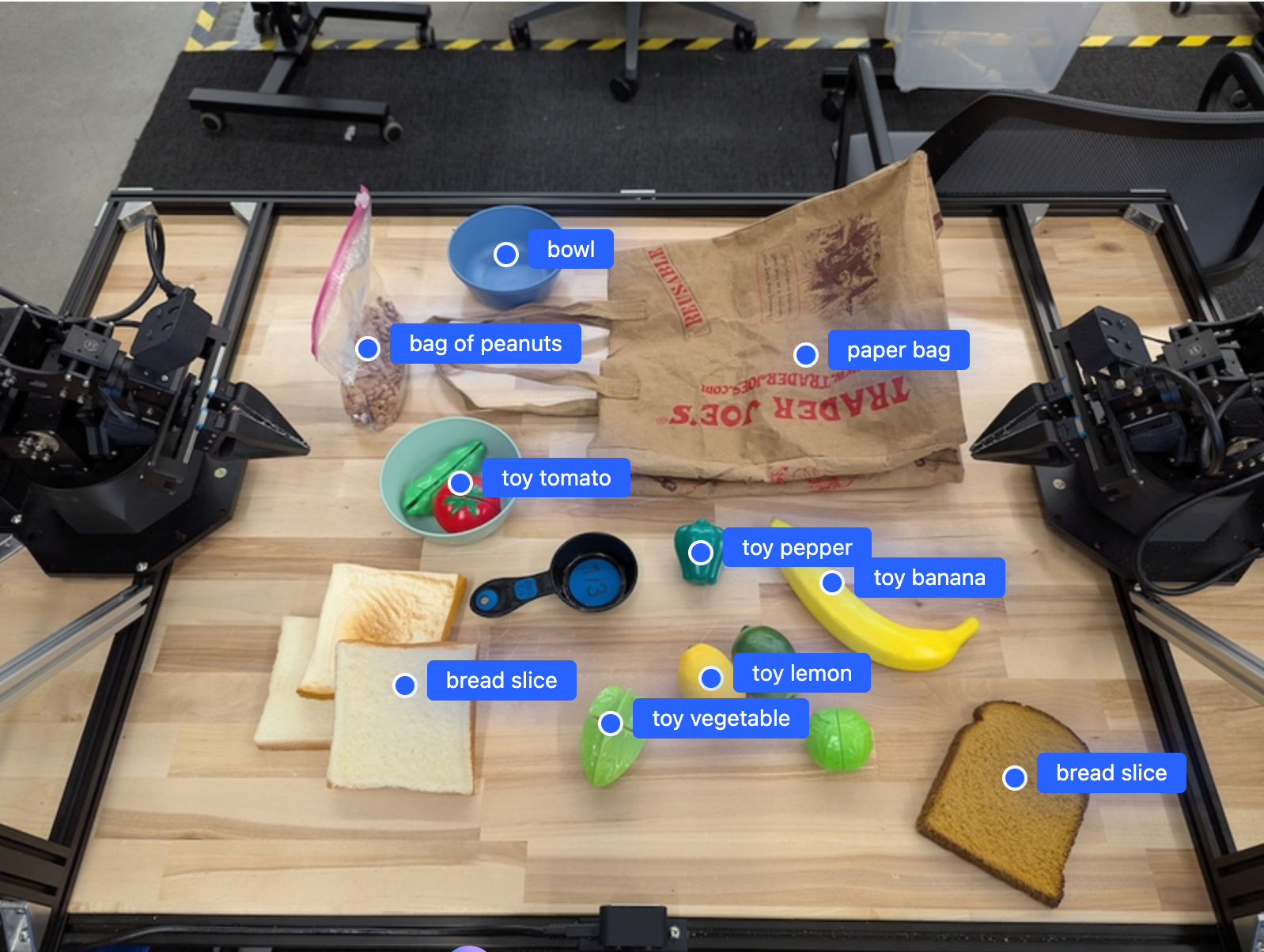
Figure 1: Object detection with 2D points showing normalized coordinates for each identified object
Object Detection with Bounding Boxes
For more precise object localization, request 2D bounding boxes instead of single points.
prompt = """
Return bounding boxes as a JSON array with labels. Never return masks
or code fencing. Limit to 25 objects. Include as many objects as you
can identify on the table.
If an object is present multiple times, name them according to their
unique characteristic (colors, size, position, etc.).
The format should be: [{"box_2d": [ymin, xmin, ymax, xmax],
"label": <label>}] normalized to 0-1000. Values must be integers.
"""

response = client.models.generate_content(
    model=MODEL_ID,
    contents=[types.Part.from_bytes(data=image_bytes, mime_type="image/jpeg"), prompt],
    config=types.GenerateContentConfig(
        temperature=0.5, thinking_config=types.ThinkingConfig(thinking_budget=0)
    ),
)

import json

boxes = json.loads(response.text)
print(f"Detected {len(boxes)} objects")const prompt = `
Return bounding boxes as a JSON array with labels. Limit to 25 objects.
Format: [{"box_2d": [ymin, xmin, ymax, xmax], "label": <label>}]
normalized to 0-1000. Values must be integers.
`;
const result = await model.generateContent([
{inlineData: {data: base64Image, mimeType: "image/jpeg"}},
prompt
], {
generationConfig: {
temperature: 0.5,
thinkingConfig: {thinkingBudget: 0}
}
});
const boxes = JSON.parse(result.response.text());
console.log(`Detected ${boxes.length} objects`);Example Output:
[
  {
    "box_2d": [
      100,
      200,
      300,
      400
    ],
    "label": "red block"
  },
  {
    "box_2d": [
      150,
      500,
      350,
      700
    ],
    "label": "blue cylinder"
  },
  {
    "box_2d": [
      200,
      100,
      400,
      300
    ],
    "label": "green sphere"
  }
]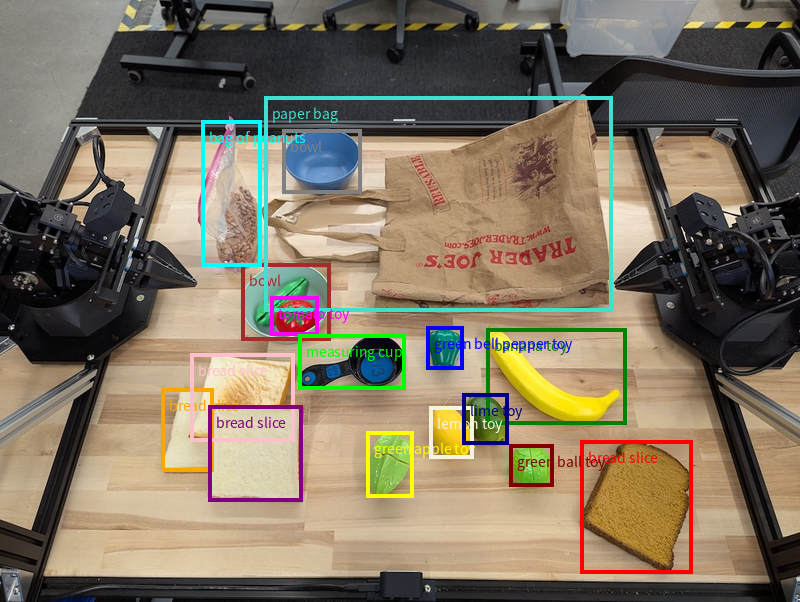
Figure 2: Object detection with 2D bounding boxes providing precise rectangular regions for each object
Tracking Objects in Video
Track objects across video frames for dynamic robotic applications.
import cv2

# Define objects to track
queries = [
    "red block (on table)",
    "red block (in gripper)",
    "blue cylinder",
]

base_prompt = f"""
Point to the following objects: {', '.join(queries)}.
Return JSON: [{{"point": [y, x], "label": <label>}}, ...].
Points in [y, x] format normalized to 0-1000.
If no objects found, return empty list [].
"""

# Load video
video = cv2.VideoCapture("robot_manipulation.mp4")
frame_count = 0
tracking_data = []

while video.isOpened():
    ret, frame = video.read()
    if not ret:
        break

    # Process every 5th frame
    if frame_count % 5 == 0:
        # Encode frame
        _, buffer = cv2.imencode(".jpg", frame)
        frame_bytes = buffer.tobytes()

        # Detect objects
        response = client.models.generate_content(
            model=MODEL_ID,
            contents=[
                types.Part.from_bytes(data=frame_bytes, mime_type="image/jpeg"),
                base_prompt,
            ],
            config=types.GenerateContentConfig(
                temperature=0.5, thinking_config=types.ThinkingConfig(thinking_budget=0)
            ),
        )

        frame_data = {"frame": frame_count, "objects": json.loads(response.text)}
        tracking_data.append(frame_data)
        print(f"Frame {frame_count}: {len(frame_data['objects'])} objects detected")

    frame_count += 1

video.release()
print(f"Processed {len(tracking_data)} frames")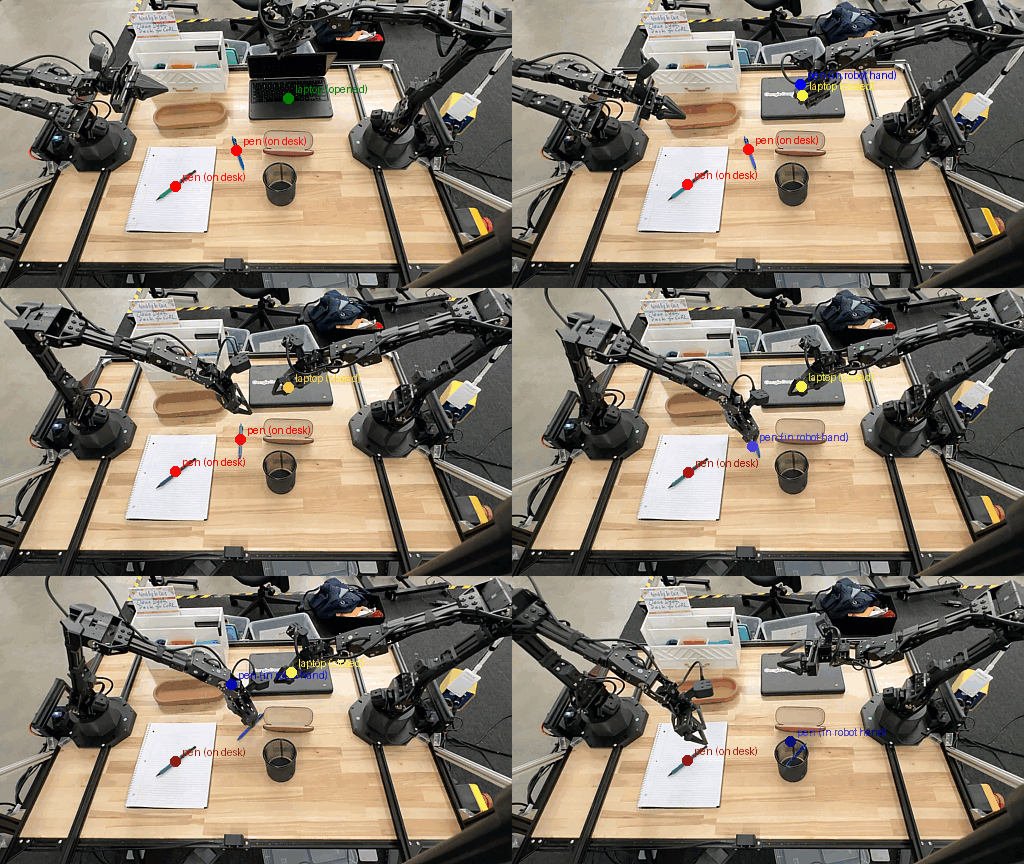
Figure 3: Tracking objects across video frames showing temporal analysis of object movement
Trajectory Planning
Generate motion paths for robot manipulators to move objects safely.
prompt = """
Place a point on the red block, then 15 points for the trajectory of
moving the red block to the top of the container on the left.
The points should be labeled by order of the trajectory, from '0'
(start point) to '15' (final point).
Return JSON: [{"point": [y, x], "label": <label>}, ...].
Points in [y, x] format normalized to 0-1000.
"""

response = client.models.generate_content(
    model=MODEL_ID,
    contents=[types.Part.from_bytes(data=image_bytes, mime_type="image/jpeg"), prompt],
    config=types.GenerateContentConfig(temperature=0.5),
)

trajectory = json.loads(response.text)
print(f"Generated trajectory with {len(trajectory)} waypoints")


# Convert normalized coordinates to robot workspace
def normalize_to_robot_coords(point, workspace_dims):
    """Convert normalized coords (0-1000) to robot workspace coords"""
    y_norm, x_norm = point
    x_robot = (x_norm / 1000.0) * workspace_dims["width"] + workspace_dims["x_min"]
    y_robot = (y_norm / 1000.0) * workspace_dims["height"] + workspace_dims["y_min"]
    return (x_robot, y_robot)


workspace = {"x_min": -0.5, "width": 1.0, "y_min": -0.5, "height": 1.0}

robot_trajectory = []
for waypoint in trajectory:
    robot_coords = normalize_to_robot_coords(waypoint["point"], workspace)
    robot_trajectory.append({"label": waypoint["label"], "coords": robot_coords})
    print(f"Waypoint {waypoint['label']}: {robot_coords}")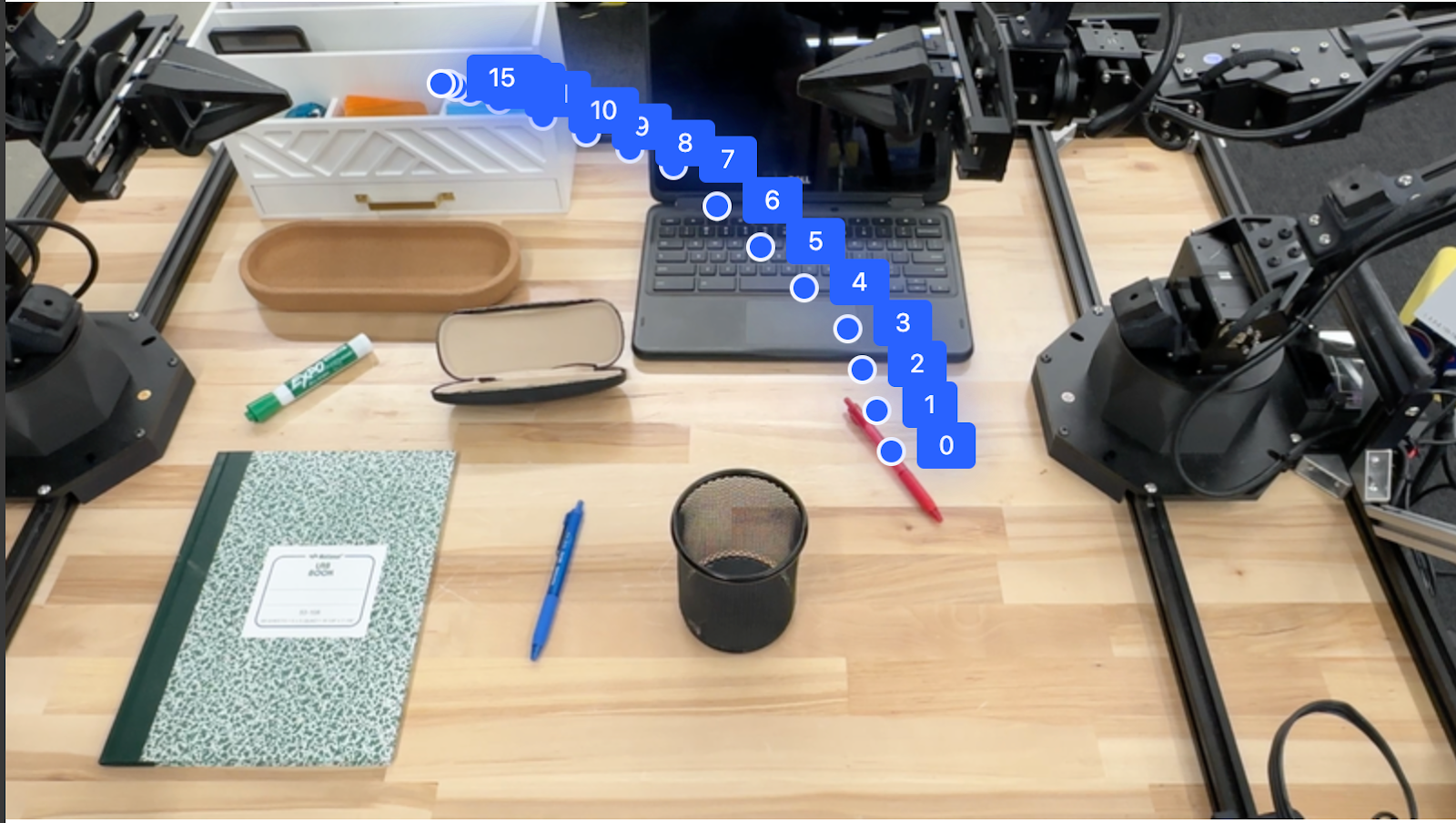
Figure 4: Trajectory planning with 15 waypoints defining the path for robot movement
Spatial Reasoning
Leverage the model's understanding of spatial relationships for complex tasks.
Example: Making Room for an Object
prompt = """
Point to the object that I need to remove to make room for my laptop.
Return JSON: [{"point": [y, x], "label": <label>}, ...].
Points in [y, x] format normalized to 0-1000.
"""

response = client.models.generate_content(
    model=MODEL_ID,
    contents=[types.Part.from_bytes(data=desk_image, mime_type="image/jpeg"), prompt],
    config=types.GenerateContentConfig(
        temperature=0.5, thinking_config=types.ThinkingConfig(thinking_budget=0)
    ),
)

result = json.loads(response.text)
print(f"Object to remove: {result[0]['label']}")
print(f"Location: {result[0]['point']}")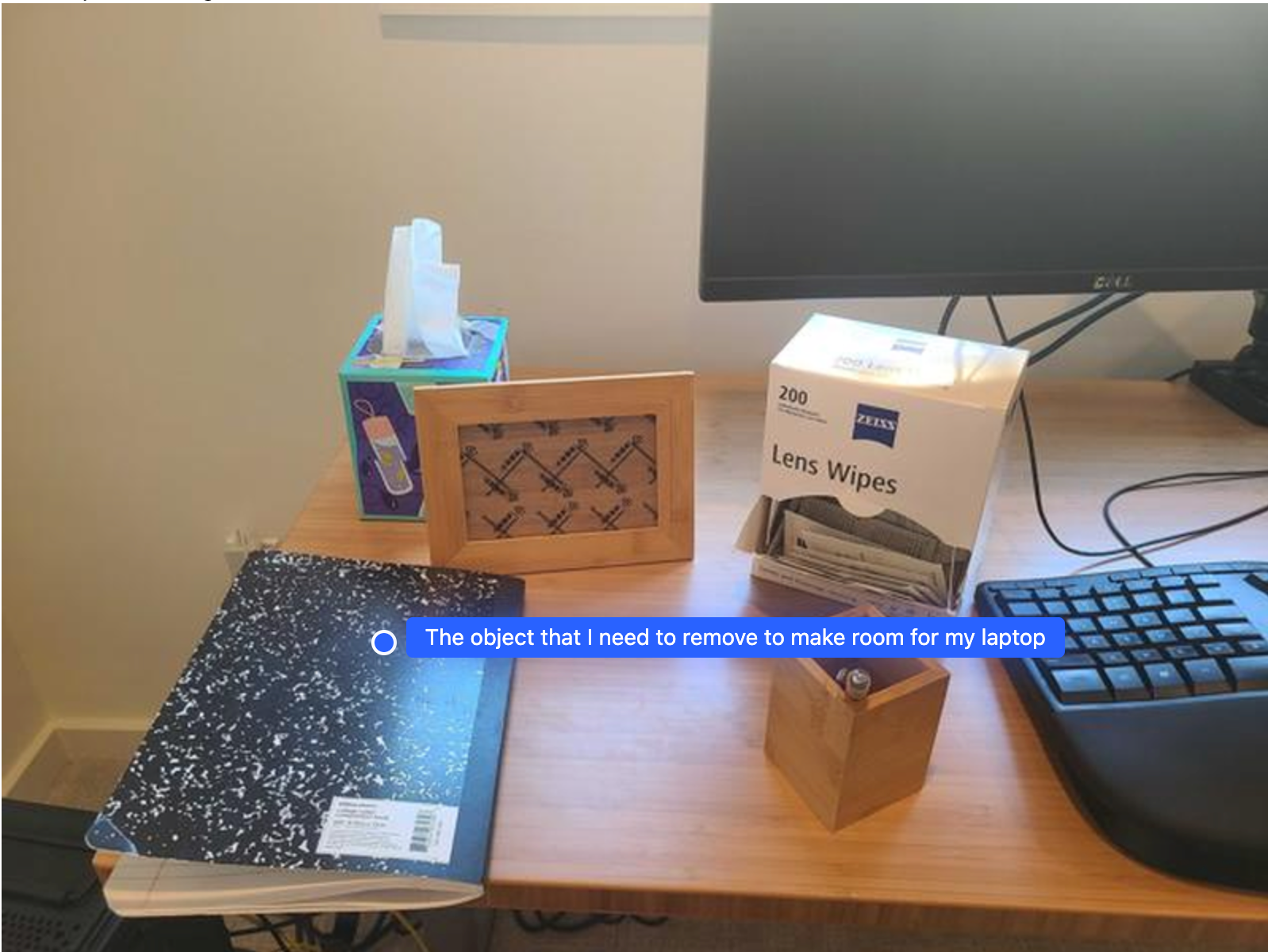
Figure 5: Spatial reasoning to identify which object should be moved to make room for a laptop
Example: Multi-Step Task Planning
prompt = """
Explain how to pack the lunch box and lunch bag. Point to each
object you refer to. Each point format:
[{"point": [y, x], "label": <object_name>}]
Coordinates normalized to 0-1000.
"""

response = client.models.generate_content(
    model=MODEL_ID,
    contents=[types.Part.from_bytes(data=lunch_image, mime_type="image/jpeg"), prompt],
    config=types.GenerateContentConfig(
        temperature=0.5, thinking_config=types.ThinkingConfig(thinking_budget=0)
    ),
)

print(response.text)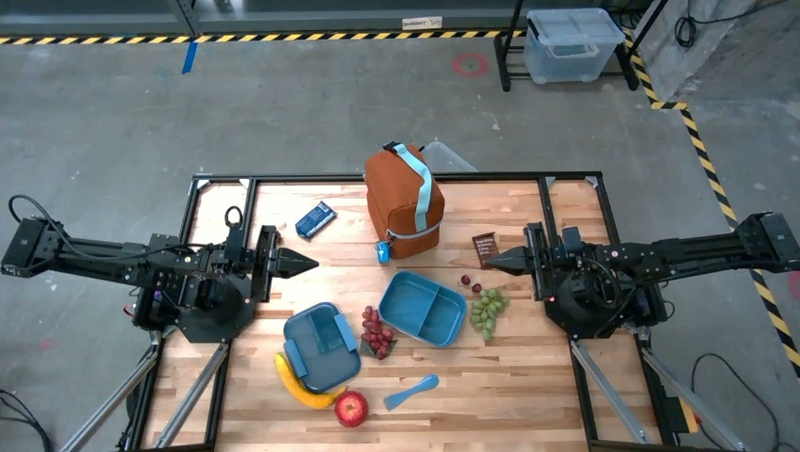
Figure 6: Multi-step task planning for packing a lunch box with step-by-step instructions
Task Orchestration
Use function calling to orchestrate complex robotic tasks with custom APIs.
Example: Pick and Place Operation
# Define mock robot API
def move(x, y, high):
    """Move arm to coordinates. high=True lifts arm above scene."""
    print(f"Moving to: x={x}, y={y}, z={'high' if high else 'low'}")


def setGripperState(opened):
    """Open or close gripper."""
    print("Opening gripper" if opened else "Closing gripper")


def returnToOrigin():
    """Return to initial state."""
    print("Returning to origin")


# First, locate objects
locate_prompt = """
Locate and point to the blue block and the orange bowl.
Return JSON: [{"point": [y, x], "label": <label>}, ...].
Points in [y, x] format normalized to 0-1000.
"""

locate_response = client.models.generate_content(
    model=MODEL_ID,
    contents=[
        types.Part.from_bytes(data=scene_image, mime_type="image/jpeg"),
        locate_prompt,
    ],
    config=types.GenerateContentConfig(temperature=0.5),
)

objects = json.loads(locate_response.text)
block = next(obj for obj in objects if "block" in obj["label"].lower())
bowl = next(obj for obj in objects if "bowl" in obj["label"].lower())

print(f"Block at: {block['point']}")
print(f"Bowl at: {bowl['point']}")

# Now orchestrate the pick-and-place
robot_origin = [500, 500]  # Normalized coordinates
block_relative = [
    block["point"][0] - robot_origin[0],
    block["point"][1] - robot_origin[1],
]
bowl_relative = [bowl["point"][0] - robot_origin[0], bowl["point"][1] - robot_origin[1]]

orchestrate_prompt = f"""
You are a robotic arm with six degrees-of-freedom. You have these functions:

def move(x, y, high):
  # Moves arm to coordinates. high=True lifts arm above scene.

def setGripperState(opened):
  # Opens gripper if opened=True, closes if False

def returnToOrigin():
  # Returns robot to initial state

Origin point is at normalized {robot_origin}.
Perform pick and place: pick up blue block at {block['point']}
(relative: {block_relative}) and place in orange bowl at {bowl['point']}
(relative: {bowl_relative}).

Provide sequence of function calls as JSON list:
[{{"function": <name>, "args": [<args>]}}, ...]
Include your reasoning before the JSON.
"""

orchestrate_response = client.models.generate_content(
    model=MODEL_ID,
    contents=[orchestrate_prompt],
    config=types.GenerateContentConfig(temperature=0.5),
)

print("Model Plan:")
print(orchestrate_response.text)

# Parse and execute function calls
import re

json_match = re.search(r"\[.*\]", orchestrate_response.text, re.DOTALL)
if json_match:
    function_calls = json.loads(json_match.group())
    print("\nExecuting:")
    for call in function_calls:
        func_name = call["function"]
        args = call["args"]
        if func_name == "move":
            move(*args)
        elif func_name == "setGripperState":
            setGripperState(*args)
        elif func_name == "returnToOrigin":
            returnToOrigin()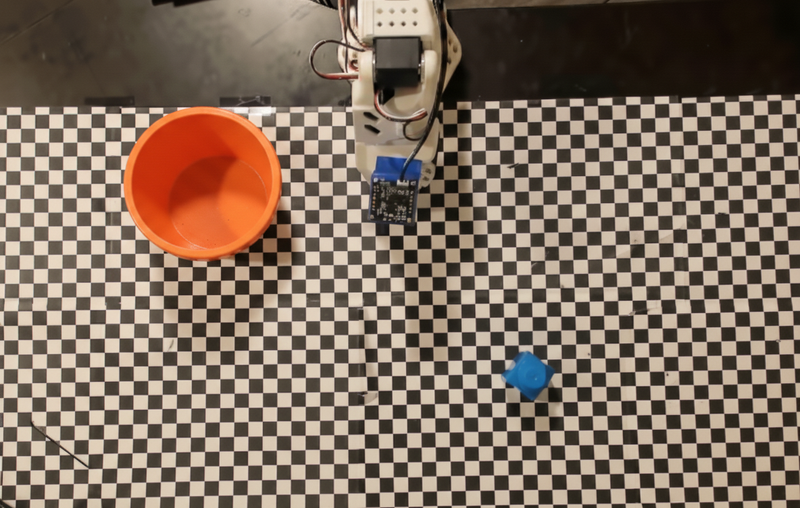
Figure 7: Pick-and-place task scenario with blue block and orange bowl
Code Execution for Dynamic Tasks
Enable the model to write and execute code for adaptive behaviors.
from google import genai
from google.genai import types

prompt = """
What is the reading on this device? Using code execution,
zoom in on the image to take a closer look if needed.
"""

response = client.models.generate_content(
    model=MODEL_ID,
    contents=[types.Part.from_bytes(data=device_image, mime_type="image/jpeg"), prompt],
    config=types.GenerateContentConfig(
        temperature=0.5, tools=[types.Tool(code_execution=types.ToolCodeExecution)]
    ),
)

# Display model's thinking and code execution
for part in response.candidates[0].content.parts:
    if part.text:
        print("Model response:", part.text)
    if part.executable_code:
        print("Generated code:", part.executable_code.code)
    if part.code_execution_result:
print("Execution result:", part.code_execution_result.output)Best Practices
1. Use Clear and Simple Language
The model is designed to understand natural, conversational language. Structure prompts semantically:
# Good: Natural language
prompt = "Find all fruit on the table and return their locations"

# Also good: Specific format requirements
prompt = """
Identify all objects on the table.
Return as JSON: [{"point": [y, x], "label": <name>}, ...]
Points normalized to 0-1000.
"""2. Optimize Visual Input
- Zoom in for detail: For small or distant objects, crop the region of interest first
- Good lighting: Ensure adequate lighting and color contrast
- Clear view: Minimize occlusions and provide unobstructed views when possible
# Crop to region of interest for better accuracy
from PIL import Image

img = Image.open("workspace.jpg")
roi = img.crop((400, 300, 800, 700))  # Focus on specific area
roi.save("workspace_roi.jpg")3. Balance Thinking Budget
Use thinking_budget to control latency vs. accuracy:
# Fast, low-latency (good for simple detection)
config = types.GenerateContentConfig(
    temperature=0.5, thinking_config=types.ThinkingConfig(thinking_budget=0)
)

# More accurate (good for complex reasoning)
config = types.GenerateContentConfig(
    temperature=0.5, thinking_config=types.ThinkingConfig(thinking_budget=2000)
)4. Break Down Complex Problems
For multi-step tasks, guide the model through each step:
# Step 1: Identify objects
objects_prompt = "List all objects on the table"
objects = get_objects(objects_prompt)

# Step 2: Plan trajectory
trajectory_prompt = f"Plan path to move {objects[0]} to the container"
trajectory = plan_trajectory(trajectory_prompt)

# Step 3: Execute motion
execute_motion(trajectory)5. Improve Accuracy Through Consensus
For high-precision tasks, query multiple times and average results:
def get_consensus_location(image, object_name, iterations=3):
    """Get object location with consensus from multiple queries"""
    results = []

    for i in range(iterations):
        prompt = f'Point to the {object_name}. Return JSON: [{{"point": [y, x], "label": "{object_name}"}}]'
        response = client.models.generate_content(
            model=MODEL_ID,
            contents=[
                types.Part.from_bytes(data=image, mime_type="image/jpeg"),
                prompt,
            ],
            config=types.GenerateContentConfig(temperature=0.5),
        )
        location = json.loads(response.text)[0]["point"]
        results.append(location)

    # Average the coordinates
    avg_y = sum(r[0] for r in results) / iterations
    avg_x = sum(r[1] for r in results) / iterations

    return [int(avg_y), int(avg_x)]


# Usage
consensus_location = get_consensus_location(image_bytes, "red block", iterations=3)
print(f"Consensus location: {consensus_location}")Troubleshooting
Common Issues and Solutions
Issue: Model returns text instead of JSON
Problem: The model includes markdown formatting or explanatory text.
Solution: Be explicit in your prompt and parse the response:
import re
import json

response_text = response.text

# Remove markdown code fences
fence_pattern = r"`{3}json\n(.*?)\n`{3}"
json_match = re.search(fence_pattern, response_text, re.DOTALL)
if json_match:
    json_text = json_match.group(1)
else:
    # Try to find JSON array or object
    json_match = re.search(r"[\[\{].*[\]\}]", response_text, re.DOTALL)
    json_text = json_match.group(0) if json_match else response_text

try:
    data = json.loads(json_text)
except json.JSONDecodeError as e:
    print(f"Failed to parse JSON: {e}")
print(f"Response text: {response_text}")Issue: Inaccurate object detection
Problem: Model misidentifies objects or provides incorrect coordinates.
Solution:
- Improve image quality and lighting
- Increase thinking budget for complex scenes
- Use more specific object descriptions
- Zoom in on the region of interest
# Use higher thinking budget for complex scenes
config = types.GenerateContentConfig(
    temperature=0.5, thinking_config=types.ThinkingConfig(thinking_budget=1000)
)

# Be more specific in prompts
prompt = (
    "Find the red rectangular block (not the cylinder) on the left side of the table"
)Issue: Slow response times
Problem: Model takes too long to respond.
Solution:
- Set thinking budget to 0 for simple tasks
- Reduce image resolution
- Process frames less frequently in video
# Resize large images
from PIL import Image

img = Image.open("large_image.jpg")
img.thumbnail((800, 600))  # Reduce size while maintaining aspect ratio
img.save("resized_image.jpg")

# Use minimal thinking for fast detection
config = types.GenerateContentConfig(
    temperature=0.5, thinking_config=types.ThinkingConfig(thinking_budget=0)
)Issue: Coordinate system mismatch
Problem: Normalized coordinates don't align with robot workspace.
Solution: Implement proper coordinate transformation:
def transform_coordinates(normalized_point, camera_calibration, robot_workspace):
    """
    Transform from normalized image coordinates to robot workspace

    Args:
        normalized_point: [y, x] in 0-1000 range
        camera_calibration: Camera calibration matrix
        robot_workspace: Robot workspace bounds

    Returns:
        [x, y, z] in robot coordinates
    """
    # Convert normalized to pixel coordinates
    y_norm, x_norm = normalized_point
    x_pixel = (x_norm / 1000.0) * camera_calibration["image_width"]
    y_pixel = (y_norm / 1000.0) * camera_calibration["image_height"]

    # Apply camera calibration matrix
    # (Implement based on your specific camera calibration)
    x_camera = x_pixel * camera_calibration["scale_x"]
    y_camera = y_pixel * camera_calibration["scale_y"]

    # Transform to robot workspace
    x_robot = x_camera + robot_workspace["offset_x"]
    y_robot = y_camera + robot_workspace["offset_y"]
    z_robot = robot_workspace["table_height"]

return [x_robot, y_robot, z_robot]Performance Optimization
Batch Processing
Process multiple images efficiently:
import concurrent.futures


def process_image(image_path):
    """Process single image"""
    with open(image_path, "rb") as f:
        image_bytes = f.read()

    response = client.models.generate_content(
        model=MODEL_ID,
        contents=[
            types.Part.from_bytes(data=image_bytes, mime_type="image/jpeg"),
            detection_prompt,
        ],
        config=config,
    )

    return json.loads(response.text)


# Process images in parallel
image_paths = ["img1.jpg", "img2.jpg", "img3.jpg"]
with concurrent.futures.ThreadPoolExecutor(max_workers=3) as executor:
    results = list(executor.map(process_image, image_paths))

for i, result in enumerate(results):
print(f"Image {i+1}: {len(result)} objects detected")Caching for Repetitive Queries
Use prompt caching for repetitive scenarios:
# The model automatically caches long prompts
# Structure your prompts to maximize cache hits

base_instructions = """
You are a robotic vision system. Always return results as JSON.
For object detection, use format: [{"point": [y, x], "label": <name>}, ...]
Points are in [y, x] format normalized to 0-1000.
Never include markdown formatting or code fences.
"""

# This base instruction will be cached
# Vary only the specific query
query = "Find all tools on the workbench"
full_prompt = base_instructions + "\n\n" + queryAdvanced Use Cases
Multi-Robot Coordination
Coordinate multiple robots using scene understanding:
def allocate_tasks(scene_image, robots, tasks):
    """
    Allocate tasks to multiple robots based on scene analysis

    Args:
        scene_image: Image of the workspace
        robots: List of robot positions [{"id": 1, "pos": [x, y]}, ...]
        tasks: List of tasks [{"obj": "block", "target": "bin"}, ...]

    Returns:
        Task allocation dictionary
    """
    # Detect all objects
    detect_prompt = "Identify all objects. Return JSON with positions."
    response = client.models.generate_content(
        model=MODEL_ID,
        contents=[
            types.Part.from_bytes(data=scene_image, mime_type="image/jpeg"),
            detect_prompt,
        ],
        config=types.GenerateContentConfig(temperature=0.5),
    )

    objects = json.loads(response.text)

    # Allocate tasks based on proximity
    allocation = {}
    for task in tasks:
        # Find object
        obj = next(o for o in objects if task["obj"] in o["label"].lower())

        # Find closest robot
        min_dist = float("inf")
        closest_robot = None
        for robot in robots:
            dist = (
                (obj["point"][0] - robot["pos"][0]) ** 2
                + (obj["point"][1] - robot["pos"][1]) ** 2
            ) ** 0.5
            if dist < min_dist:
                min_dist = dist
                closest_robot = robot["id"]

        allocation[closest_robot] = allocation.get(closest_robot, [])
        allocation[closest_robot].append(task)

return allocationSafety Monitoring
Monitor for unsafe conditions:
def check_workspace_safety(image):
    """Check workspace for safety hazards"""
    safety_prompt = """
    Analyze this robotic workspace for safety issues.
    Check for:
    1. Obstacles in robot path
    2. Objects near workspace edges
    3. Humans or body parts in the scene
    4. Unstable object arrangements

    Return JSON: {"safe": true/false, "issues": [<list of issues>]}
    """

    response = client.models.generate_content(
        model=MODEL_ID,
        contents=[
            types.Part.from_bytes(data=image, mime_type="image/jpeg"),
            safety_prompt,
        ],
        config=types.GenerateContentConfig(temperature=0.5),
    )

    return json.loads(response.text)


# Usage
safety_status = check_workspace_safety(workspace_image)
if not safety_status["safe"]:
    print("SAFETY WARNING:", safety_status["issues"])
# Halt robot operationsAdaptive Grasping
Plan grasps based on object properties:
def plan_grasp(image, object_name):
    """Plan grasp configuration for object"""
    grasp_prompt = f"""
    Analyze the {object_name} and recommend grasp configuration.
    Consider:
    - Object shape and size
    - Grasp points (stable contact locations)
    - Approach angle
    - Required gripper width

    Return JSON: {{
        "grasp_points": [[y1, x1], [y2, x2]],
        "approach_angle": <degrees>,
        "gripper_width": <mm>,
        "confidence": <0-1>
    }}
    """

    response = client.models.generate_content(
        model=MODEL_ID,
        contents=[
            types.Part.from_bytes(data=image, mime_type="image/jpeg"),
            grasp_prompt,
        ],
        config=types.GenerateContentConfig(temperature=0.5),
    )

return json.loads(response.text)Related Links
- Gemini Robotics-ER Model Announcement
- Google Models Documentation
- Native Gemini API (v1beta) Reference
- Function Calling Guide
- Vision Guide
- Best Practices for Production
Conclusion
Gemini Robotics-ER 1.5 brings powerful AI capabilities to robotics applications. By combining vision, language understanding, and spatial reasoning, it enables more natural and flexible robot interactions. Start with simple object detection, then progressively incorporate more advanced features like trajectory planning and task orchestration.
For production deployments, always implement proper error handling, safety checks, and coordinate system calibration. Monitor performance metrics and adjust thinking budgets based on your latency and accuracy requirements.
Happy building! 🤖