
Function Calling
Enable models to interact with your custom code or external APIs by defining functions the model can call.
Introduction
Function calling allows AvalAI models to intelligently decide when to call specific functions you define based on the user's input. Instead of just generating text, the model can output a structured JSON object containing arguments to call one or more of your functions. This enables building applications that can:
- Fetch Data: Retrieve real-time information (e.g., weather, stock prices) or data from your internal knowledge bases to enrich the model's response (RAG).
- Take Action: Perform operations like sending emails, updating databases, calling external services, or interacting with your application's UI or backend.
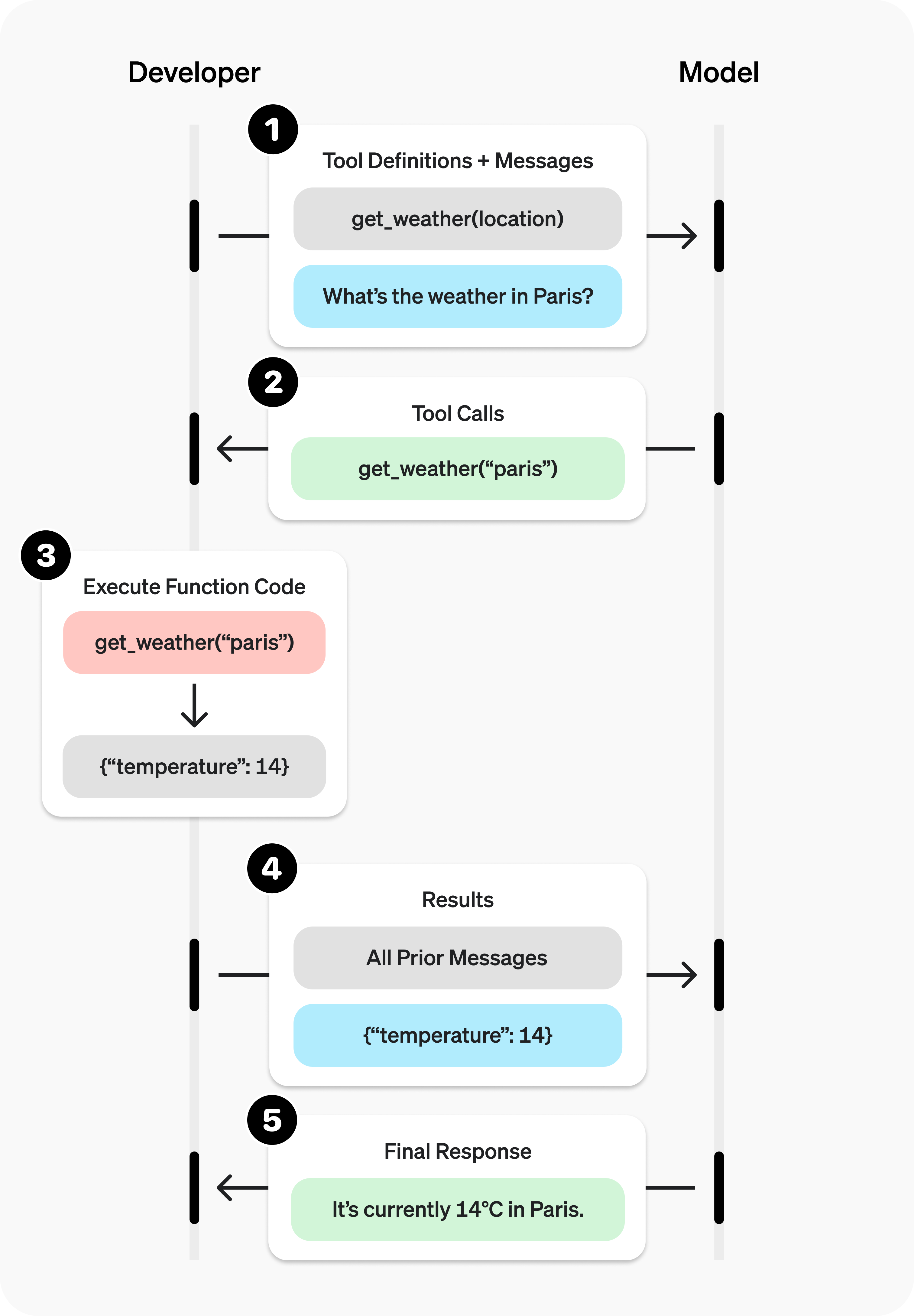 (Diagram Source: OpenAI)
Function Calling Steps
Here's the typical workflow for using function calling with AvalAI:
- Define Functions: Provide the model with a list of available functions (tools) including their names, descriptions, and parameter schemas in your API request. See Defining Functions.
- Model Decides: The model processes the user input and decides if calling one or more functions is appropriate. If so, it returns a
tool_callsobject in the response message. - Execute Function: Your application code parses the
tool_callsmessage, executes the specified function(s) with the provided arguments, and retrieves the result(s). See Handling Function Calls. - Send Result Back: Call the model again, appending the original assistant message (with
tool_calls) and newtoolrole messages containing the function results. See Sending Results Back. - Model Responds: The model incorporates the function's result(s) into its final response to the user.
Choose the Right Tool-Calling Route
Use the same business logic for both routes, but pick the wire format that matches your app:
| Use case | Recommended route | Why |
|---|---|---|
| Existing chat integration | /v1/chat/completions | Preserves messages, tool_calls, and role: "tool" result messages with minimal migration work. |
| New agentic workflow | /v1/responses | Gives typed response.output items, function_call_output, reasoning items, and a cleaner path to stateful workflows. |
| Large tool catalog | /v1/responses when route-supported | Pair namespaces with tool_search or keep a small direct tools list when tool_search is unavailable. |
| State-changing or paid action | Either route | Use strict: true, validate arguments in code, and set parallel_tool_calls: false when order or approval matters. |
For Responses with reasoning-capable models, preserve returned reasoning and function-call output items when you manually continue the conversation. If you drop those items, the next turn can lose the model’s tool-use context. For existing Chat Completions apps, keep the older /v1/chat/completions flow and add a Responses version during migration rather than replacing working code all at once.
Production Schema Checklist
Before shipping a tool-enabled workflow, check the function contract from the model’s point of view and from your handler’s point of view:
- Name the action clearly: Use specific function names and descriptions, and describe each parameter’s format plus what the tool output means.
- Prefer strict contracts: Set
strict: true, useadditionalProperties: false, list every property inrequired, and represent optional fields with nullable unions such as["string", "null"]. - Keep app-known values in code: Do not ask the model for IDs, permissions, prices, or selected UI state your application already knows; inject those values in the handler.
- Validate again server-side: Treat generated
argumentsas untrusted JSON. Parse, validate, authorize, and return structured errors rather than executing blindly. - Limit the active tool set: Keep the initial
toolslist small, group large catalogs with namespaces, and usetool_searchonly when the selected AvalAI route/model supports it. - Control side effects: Set
parallel_tool_calls: falsefor writes, payments, inventory, approvals, or ordered workflows; when using Responses, preserve matchingcall_idvalues and reasoning/function-call items across turns.
Example: Getting Weather
Let's illustrate with a get_current_weather function.
Step 1 & 2: Define function and call the model
Make a request to the Chat Completions API including the function definition(s) in the tools parameter.
TOOLS_JSON=$(
  cat <<'JSON'
[
  {
    "type": "function",
    "function": {
      "name": "get_current_weather",
      "description": "Get the current weather in a given location",
      "parameters": {
        "type": "object",
        "properties": {
          "location": {
            "type": "string",
            "description": "The city and state, e.g. San Francisco, CA"
          },
          "unit": {
            "type": ["string", "null"],
            "enum": ["celsius", "fahrenheit", null]
          }
        },
        "required": ["location", "unit"],
        "additionalProperties": false
      },
      "strict": true
    }
  }
]
JSON
)

curl https://api.avalai.ir/v1/chat/completions \
  -H "Authorization: Bearer $AVALAI_API_KEY" \
  -H "Content-Type: application/json" \
  -d '{
    "model": "gpt-5.6-luna",
    "messages": [
      {"role": "user", "content": "What'\''s the weather like in Boston?"}
    ],
    "tools": '"$TOOLS_JSON"',
    "tool_choice": "auto"
}'import os
from openai import OpenAI
import json
client = OpenAI(
api_key=os.environ["AVALAI_API_KEY"],
base_url="https://api.avalai.ir/v1", # AvalAI API endpoint
)
# Define the function schema
tools = [
{
"type": "function",
"function": {
"name": "get_current_weather",
"description": "Get the current weather in a given location",
"parameters": {
"type": "object",
"properties": {
"location": {
"type": "string",
"description": "The city and state, e.g. San Francisco, CA",
},
"unit": {
"type": ["string", "null"],
"enum": ["celsius", "fahrenheit", None],
},
},
"required": ["location", "unit"],
"additionalProperties": False,
},
"strict": True,
},
}
]
messages = [{"role": "user", "content": "What's the weather like in Boston?"}]
try:
response = client.chat.completions.create(
model="gpt-5.6-luna", # Use a model supporting function calling via AvalAI
messages=messages,
tools=tools,
tool_choice="auto", # Default: let model decide
)
response_message = response.choices[0].message
tool_calls = response_message.tool_calls
# Step 3 logic follows...
if tool_calls:
print("Model wants to call functions:")
print(tool_calls)
# Store response_message and tool_calls for Step 3 & 4
else:
print("Model did not request function call.")
print(response_message.content)
except Exception as e:
print(f"An API error occurred: {e}")import OpenAI from "openai";
const client = new OpenAI({
apiKey: process.env.AVALAI_API_KEY,
baseURL: "https://api.avalai.ir/v1", // Use AvalAI base URL
});
async function callWeatherFunction() {
const tools = [
{
type: "function",
function: {
name: "get_current_weather",
description: "Get the current weather in a given location",
parameters: {
type: "object",
properties: {
location: {
type: "string",
description: "The city and state, e.g. San Francisco, CA",
},
unit: {
type: ["string", "null"],
enum: ["celsius", "fahrenheit", null],
},
},
required: ["location", "unit"],
additionalProperties: false,
},
strict: true,
},
},
];
const messages = [
{ role: "user", content: "What's the weather like in Boston?" },
];
try {
const response = await client.chat.completions.create({
model: "gpt-5.6-luna", // Use a model supporting function calling via AvalAI
messages: messages,
tools: tools,
tool_choice: "auto", // Default: let model decide
});
const responseMessage = response.choices[0].message;
const toolCalls = responseMessage.tool_calls;
// Step 3 logic follows...
if (toolCalls) {
console.log("Model wants to call functions:");
console.log(toolCalls);
// Store responseMessage and toolCalls for Step 3 & 4
} else {
console.log("Model did not request function call.");
console.log(responseMessage.content);
}
} catch (error) {
console.error("An API error occurred:", error);
}
}
callWeatherFunction();package main
import (
"context"
"fmt"
"os"
openai "github.com/openai/openai-go"
)
func main() {
apiKey := os.Getenv("AVALAI_API_KEY")
baseURL := "https://api.avalai.ir/v1" // Use AvalAI base URL
config := openai.DefaultConfig(apiKey)
config.BaseURL = baseURL
client := openai.NewClientWithConfig(config)
tools := []openai.Tool{
{
Type: openai.ToolTypeFunction,
Function: &openai.FunctionDefinition{
Name: "get_current_weather",
Description: "Get the current weather in a given location",
Parameters: map[string]interface{}{
"type": "object",
"properties": map[string]interface{}{
"location": map[string]interface{}{
"type": "string",
"description": "The city and state, e.g. San Francisco, CA",
},
"unit": map[string]interface{}{
"type": []string{"string", "null"},
"enum": []interface{}{"celsius", "fahrenheit", nil},
},
},
"required": []string{"location", "unit"},
"additionalProperties": false,
},
},
},
}
messages := []openai.ChatCompletionMessage{
{Role: openai.ChatMessageRoleUser, Content: "What's the weather like in Boston?"},
}
resp, err := client.CreateChatCompletion(
context.Background(),
openai.ChatCompletionRequest{
Model: "gpt-5.6-luna", // Use a model supporting function calling via AvalAI
Messages: messages,
Tools: tools,
ToolChoice: "auto", // Default: let model decide
},
)
if err != nil {
fmt.Printf("ChatCompletion error: %v\n", err)
return
}
responseMessage := resp.Choices[0].Message
toolCalls := responseMessage.ToolCalls
// Step 3 logic follows...
if len(toolCalls) > 0 {
fmt.Println("Model wants to call functions:")
// Loop through toolCalls for Step 3 & 4
for _, toolCall := range toolCalls {
fmt.Printf(" ID: %s, Type: %s, Function: %s, Args: %s\n",
toolCall.ID, toolCall.Type, toolCall.Function.Name, toolCall.Function.Arguments)
}
// Store responseMessage and toolCalls for Step 3 & 4
} else {
fmt.Println("Model did not request function call.")
fmt.Println(responseMessage.Content)
}
}<?php
require 'vendor/autoload.php'; // Ensure you have the OpenAI PHP client installed
$apiKey = getenv('AVALAI_API_KEY');
$baseURL = 'https://api.avalai.ir/v1'; // Use AvalAI base URL
$client = OpenAI::client($apiKey);
// Note: Setting base URL might depend on the specific PHP client library version.
// Consult your library's documentation. Some might use a factory or configuration object.
// Example using a factory-style configuration:
// $client = OpenAI::factory()
// ->withApiKey($apiKey)
// ->withBaseUri($baseURL)
// ->make();
$tools = [
[
'type' => 'function',
'function' => [
'name' => 'get_current_weather',
'description' => 'Get the current weather in a given location',
'parameters' => [
'type' => 'object',
'properties' => [
'location' => [
'type' => 'string',
'description' => 'The city and state, e.g. San Francisco, CA',
],
'unit' => [
'type' => ['string', 'null'],
'enum' => ['celsius', 'fahrenheit', null],
],
],
'required' => ['location', 'unit'],
'additionalProperties' => false,
],
'strict' => true,
],
]
];
$messages = [['role' => 'user', 'content' => "What's the weather like in Boston?"]];
try {
$response = $client->chat()->create([
'model' => 'gpt-5.6-luna', // Use a model supporting function calling via AvalAI
'messages' => $messages,
'tools' => $tools,
'tool_choice' => 'auto', // Default: let model decide
]);
$responseMessage = $response->choices[0]->message;
$toolCalls = $responseMessage->toolCalls ?? null; // Use null coalescing for safety
// Step 3 logic follows...
if ($toolCalls) {
echo "Model wants to call functions:\n";
print_r($toolCalls); // Or loop through them
// Store $responseMessage and $toolCalls for Step 3 & 4
} else {
echo "Model did not request function call.\n";
echo $responseMessage->content;
}
} catch (Exception $e) {
echo "An API error occurred: " . $e->getMessage() . "\n";
}Responses API version
Use this version when the selected model supports /v1/responses. In Responses, function tools are internally tagged: type, name, description, parameters, and strict sit on the tool object. Inspect response.output for function_call items.
import os
from openai import OpenAI

client = OpenAI(
    api_key=os.environ["AVALAI_API_KEY"],
    base_url="https://api.avalai.ir/v1",
)

tools = [
    {
        "type": "function",
        "name": "get_current_weather",
        "description": "Get the current weather in a given location.",
        "parameters": {
            "type": "object",
            "properties": {
                "location": {
                    "type": "string",
                    "description": "The city and state, e.g. Boston, MA",
                }
            },
            "required": ["location"],
            "additionalProperties": False,
        },
        "strict": True,
    }
]

response = client.responses.create(
    model="gpt-5.6-luna",
    input="What's the weather like in Boston?",
    tools=tools,
)

for item in response.output:
    if item.type == "function_call":
        print("Function:", item.name)
print("Arguments:", item.arguments)import OpenAI from "openai";
const client = new OpenAI({
apiKey: process.env.AVALAI_API_KEY,
baseURL: "https://api.avalai.ir/v1",
});
const tools = [
{
type: "function",
name: "get_current_weather",
description: "Get the current weather in a given location.",
parameters: {
type: "object",
properties: {
location: {
type: "string",
description: "The city and state, e.g. Boston, MA",
},
},
required: ["location"],
additionalProperties: false,
},
strict: true,
},
];
const response = await client.responses.create({
model: "gpt-5.6-luna",
input: "What's the weather like in Boston?",
tools,
});
for (const item of response.output) {
if (item.type === "function_call") {
console.log("Function:", item.name);
console.log("Arguments:", item.arguments);
}
}curl https://api.avalai.ir/v1/responses \
-H "Content-Type: application/json" \
-H "Authorization: Bearer $AVALAI_API_KEY" \
-d '{
"model": "gpt-5.6-luna",
"input": "What'"'"'s the weather like in Boston?",
"tools": [
{
"type": "function",
"name": "get_current_weather",
"description": "Get the current weather in a given location.",
"parameters": {
"type": "object",
"properties": {
"location": {
"type": "string",
"description": "The city and state, e.g. Boston, MA"
}
},
"required": ["location"],
"additionalProperties": false
},
"strict": true
}
]
}'messages→input- Chat Completions tool config
{ type: "function", function: {...} }→ Responses tool config{ type: "function", name, description, parameters, strict } choices[0].message.tool_calls→response.outputitems withtype: "function_call"- tool arguments remain JSON strings; parse them before calling your code.
Expected Model Output (Function Call Request):
If the model decides to call the function, the tool_calls field in the response message (e.g., response_message.tool_calls in Python/JS, resp.Choices[0].Message.ToolCalls in Go) will contain something like this:
[
  {
    "id": "call_abc123", // Unique ID for this specific call

    "type": "function",
    "function": {
      "name": "get_current_weather",
      "arguments": "{\"location\": \"Boston, MA\", \"unit\": \"fahrenheit\"}" // Arguments as a JSON string

    }
  }
](Note: The id field is crucial for matching the call with its result in Step 4)
Step 3: Execute the function
Your application code needs to handle the function call based on the name and arguments provided in the tool_calls.
(Note: The following Python code demonstrates the logic. You would implement similar logic in your chosen language (JavaScript, Go, PHP, etc.) using the tool_calls received in Step 2.)
# Placeholder for your actual function implementation in Python
def get_current_weather(location, unit="fahrenheit"):
    """Dummy function to get weather"""
    unit = unit or "fahrenheit"
    print(f"--- Called get_current_weather(location='{location}', unit='{unit}') ---")
    if "boston" in location.lower():
        weather_info = {
            "location": location,
            "temperature": "72",
            "unit": unit,
            "forecast": "sunny",
        }
        return json.dumps(weather_info)
    else:
        weather_info = {"location": location, "temperature": "unknown"}
        return json.dumps(weather_info)


# --- Python Logic to process tool calls and prepare results ---
# Assume 'response_message' and 'tool_calls' are stored from Step 2 response

available_functions = {
    "get_current_weather": get_current_weather,
}

# Append the assistant's response message to the conversation history
# Ensure messages list is properly maintained across steps
if "messages" not in locals():
    messages = []  # Initialize if not existing
messages.append(response_message)

results_for_next_call = []  # Store results to send back in Step 4

# Iterate through each tool call requested by the model
if tool_calls:  # Ensure tool_calls is not None
    for tool_call in tool_calls:
        function_name = tool_call.function.name
        function_to_call = available_functions.get(function_name)

        if function_to_call:
            try:
                function_args = json.loads(tool_call.function.arguments)
                # Call the actual function
                function_response = function_to_call(**function_args)

                # Prepare the message for the next API call
                results_for_next_call.append(
                    {
                        "tool_call_id": tool_call.id,  # Match the ID from the request
                        "role": "tool",
                        "name": function_name,
                        "content": function_response,  # Result of your function as a string
                    }
                )
            except Exception as e:
                print(f"Error executing function {function_name}: {e}")
                # Optionally append an error message back to the model
                results_for_next_call.append(
                    {
                        "tool_call_id": tool_call.id,
                        "role": "tool",
                        "name": function_name,
                        "content": json.dumps(
                            {"error": f"Failed to execute: {str(e)}"}
                        ),
                    }
                )
        else:
            print(f"Function {function_name} not found.")
            # Append a message indicating function not found
            results_for_next_call.append(
                {
                    "tool_call_id": tool_call.id,
                    "role": "tool",
                    "name": function_name,
                    "content": json.dumps({"error": "Function not implemented"}),
                }
            )

# 'results_for_next_call' now contains the messages to be sent in Step 4
print("\nPrepared results for next API call:")
print(results_for_next_call)Step 4 & 5: Send results back and get final response
Append the function result(s) as new messages with role: "tool" to your conversation history and make another API call. The model will use the results to generate its final response.
# Assuming $ASSISTANT_MSG_JSON contains the assistant's message JSON string from Step 2
# Assuming $TOOL_RESULTS_JSON contains the JSON array string of tool result messages from Step 3
# Assuming $USER_MSG_JSON contains the original user message JSON string

# Construct the full messages array JSON string
MESSAGES_JSON=$(echo "[$USER_MSG_JSON, $ASSISTANT_MSG_JSON]" | jq -c '. + '"$TOOL_RESULTS_JSON")

curl https://api.avalai.ir/v1/chat/completions \
  -H "Authorization: Bearer $AVALAI_API_KEY" \
  -H "Content-Type: application/json" \
  -d '{
    "model": "gpt-5.6-luna",
    "messages": '"$MESSAGES_JSON"'
}'# Assume 'messages' contains the history up to the assistant's tool_calls message
# Assume 'results_for_next_call' contains the list of tool result messages from Step 3
if results_for_next_call:
messages.extend(results_for_next_call) # Add tool results to the message history
print("\nSending results back to model...")
try:
second_response = client.chat.completions.create(
model="gpt-5.6-luna",
messages=messages,
# No tools needed here unless you want potential follow-up calls
)
# Step 5: Get the final response
final_response = second_response.choices[0].message.content
print("\nFinal Model Response:")
print(final_response)
except Exception as e:
print(f"An API error occurred on the second call: {e}")// Assume 'messages' contains the history up to the assistant's tool_calls message
// Assume 'resultsForNextCall' contains the array of tool result messages from Step 3
async function sendResultsAndGetResponse(messages, resultsForNextCall) {
if (resultsForNextCall && resultsForNextCall.length > 0) {
// Add tool results to the message history
const updatedMessages = messages.concat(resultsForNextCall);
console.log("\nSending results back to model...");
try {
const secondResponse = await client.chat.completions.create({
model: "gpt-5.6-luna",
messages: updatedMessages,
// No tools needed here unless you want potential follow-up calls
});
// Step 5: Get the final response
const finalResponse = secondResponse.choices[0].message.content;
console.log("\nFinal Model Response:");
console.log(finalResponse);
} catch (error) {
console.error("An API error occurred on the second call:", error);
}
}
}
// Example usage (assuming messages and resultsForNextCall are populated from previous steps)
// Ensure 'messages' includes the user message and the assistant message with tool_calls
// sendResultsAndGetResponse(messages, resultsForNextCall);// Assume 'messages' contains the history up to the assistant's tool_calls message
// Assume 'resultsForNextCall' contains the slice of tool result messages from Step 3
func sendResultsAndGetResponse(client *openai.Client, messages []openai.ChatCompletionMessage, resultsForNextCall []openai.ChatCompletionMessage) {
if len(resultsForNextCall) > 0 {
// Add tool results to the message history
messages = append(messages, resultsForNextCall...)
fmt.Println("\nSending results back to model...")
resp, err := client.CreateChatCompletion(
context.Background(),
openai.ChatCompletionRequest{
Model: "gpt-5.6-luna",
Messages: messages,
// No tools needed here unless you want potential follow-up calls
},
)
if err != nil {
fmt.Printf("ChatCompletion error on second call: %v\n", err)
return
}
// Step 5: Get the final response
finalResponse := resp.Choices[0].Message.Content
fmt.Println("\nFinal Model Response:")
fmt.Println(finalResponse)
}
}
// Example usage (assuming client, messages and resultsForNextCall are populated)
// Ensure 'messages' includes the user message and the assistant message with tool_calls
// sendResultsAndGetResponse(client, messages, resultsForNextCall)<?php
// Assume $messages contains the history up to the assistant's tool_calls message
// Assume $resultsForNextCall contains the array of tool result messages from Step 3
if (!empty($resultsForNextCall)) {
// Add tool results to the message history
$updatedMessages = array_merge($messages, $resultsForNextCall);
echo "\nSending results back to model...\n";
try {
$secondResponse = $client->chat()->create([
'model' => 'gpt-5.6-luna',
'messages' => $updatedMessages,
// No tools needed here unless you want potential follow-up calls
]);
// Step 5: Get the final response
$finalResponse = $secondResponse->choices[0]->message->content;
echo "\nFinal Model Response:\n";
echo $finalResponse . "\n";
} catch (Exception $e) {
echo "An API error occurred on the second call: " . $e->getMessage() . "\n";
}
}Responses API version
Use function_call_output items to return tool results. The call_id must match the call_id from the function_call output item, then you call /v1/responses again with the original output items plus the tool result.
import json

input_items = [{"role": "user", "content": "What's the weather like in Boston?"}]

response = client.responses.create(
    model="gpt-5.6-luna",
    input=input_items,
    tools=tools,
)

input_items += response.output

for item in response.output:
    if item.type != "function_call":
        continue

    if item.name == "get_current_weather":
        args = json.loads(item.arguments)
        tool_result = get_current_weather(**args)

        input_items.append(
            {
                "type": "function_call_output",
                "call_id": item.call_id,
                "output": tool_result,
            }
        )

final_response = client.responses.create(
    model="gpt-5.6-luna",
    input=input_items,
    tools=tools,
)

print(final_response.output_text)let input = [{ role: "user", content: "What's the weather like in Boston?" }];
let response = await client.responses.create({
model: "gpt-5.6-luna",
input,
tools,
});
input = input.concat(response.output);
for (const item of response.output) {
if (item.type !== "function_call") continue;
if (item.name === "get_current_weather") {
const args = JSON.parse(item.arguments);
const toolResult = getCurrentWeather(args.location);
input.push({
type: "function_call_output",
call_id: item.call_id,
output: toolResult,
});
}
}
const finalResponse = await client.responses.create({
model: "gpt-5.6-luna",
input,
tools,
});
console.log(finalResponse.output_text);# Use the first Responses call to capture the function_call item and call_id.
# Then send the model output item plus a matching function_call_output item.
curl https://api.avalai.ir/v1/responses \
-H "Content-Type: application/json" \
-H "Authorization: Bearer $AVALAI_API_KEY" \
-d '{
"model": "gpt-5.6-luna",
"input": [
{"role": "user", "content": "What is the weather like in Boston?"},
{
"type": "function_call",
"call_id": "call_abc123",
"name": "get_current_weather",
"arguments": "{\"location\":\"Boston, MA\"}"
},
{
"type": "function_call_output",
"call_id": "call_abc123",
"output": "{\"temperature\":\"72\",\"unit\":\"fahrenheit\",\"forecast\":\"sunny\"}"
}
],
"tools": [
{
"type": "function",
"name": "get_current_weather",
"description": "Get the current weather in a given location.",
"parameters": {
"type": "object",
"properties": {"location": {"type": "string"}},
"required": ["location"],
"additionalProperties": false
},
"strict": true
}
]
}'- Chat Completions sends tool results as
role: "tool"messages withtool_call_id. - Responses sends tool results as
type: "function_call_output"input items with the matchingcall_id. - Preserve the model's prior
response.outputitems when manually managing state, especially reasoning and function-call items. - For reasoning-capable models, pass back every reasoning item returned with the tool call alongside the function output; dropping those items can break the next reasoning step.
Expected Final Output (Step 5):
The current weather in Boston, MA is 72°F and sunny.Defining Functions (tools Parameter)
You define functions within the tools parameter of your API request. Each tool of type function requires a schema describing its purpose and parameters.
The same function schema has two wire shapes depending on the route:
| Route | Function shape | Returned call | Tool result |
|---|---|---|---|
/v1/chat/completions | Externally tagged: { "type": "function", "function": { ... } } | choices[0].message.tool_calls[] | role: "tool" message with tool_call_id |
/v1/responses | Internally tagged: { "type": "function", "name": "...", "description": "...", "parameters": {...}, "strict": true } | response.output[] item with type: "function_call" | input item with type: "function_call_output" and matching call_id |
Use the Chat Completions shape for existing chat integrations. Use the Responses shape for new agentic flows, especially when you need typed output items, reasoning context, or a cleaner migration path to built-in tools.
{
  "type": "function",
  "function": {
    "name": "your_function_name",
    "description": "A clear description of what the function does and when to use it.",
    "parameters": {
      "type": "object",
      "properties": {
        "param1": {
          "type": "string",
          "description": "Description of the first parameter."
        },
        "param2": {
          "type": [
            "number",
            "null"
          ],
          "description": "Description of the second parameter. Use null when omitted."
        },
        "param3": {
          "type": "string",
          "enum": [
            "value1",
            "value2"
          ],
          "description": "Parameter with specific allowed values."
        }
      },
      "required": [
        "param1",
        "param2",
        "param3"
      ],
      "additionalProperties": false
    },
    "strict": true
  }
}type: Must be"function".function.name: The name your code will use to identify the function (e.g.,get_current_weather).function.description: Crucial for helping the model understand when and why to call the function. Be detailed.function.parameters: A JSON Schema object defining the arguments the function accepts.type: Must be"object".properties: Defines each parameter (name, type, description, optional enum).required: An array listing mandatory parameters.additionalProperties: false: Prevents the model from inventing extra parameters. Recommended.
function.strict: Set this totruewhenever the model should reliably match your schema, similar toresponse_formatwithjson_schemain Structured Outputs. RequiresadditionalProperties: falseand all properties listed inrequired(use{"type": ["string", "null"]}for optional parameters). See Strict Mode below.
Schema Authoring Helpers
OpenAI's docs describe two helper paths for creating function schemas: SDK helpers that convert Pydantic/Zod-style objects into tool schemas, and Playground-assisted schema generation/iteration. Use those as accelerators, not as a substitute for review. Generated schemas can miss edge cases, and not every Pydantic or Zod feature maps cleanly to the supported JSON Schema subset.
Before using a generated schema with AvalAI:
- Review
description,enum,required, andadditionalPropertiesby hand. - Confirm optional fields use a nullable union such as
{"type": ["string", "null"]}whenstrict: trueis enabled. - Add representative eval or integration tests for malformed arguments, missing fields, and tool failures.
- Keep the source type definition, generated schema, and server-side validator in sync so the model and your handler agree on the contract.
Best Practices for Defining Functions
- Clear descriptions: Write detailed descriptions for the function and each parameter. Explain the purpose, expected format, side effects, and what the returned value represents.
- Usage rules in the developer prompt: Tell the model when to use the function, when not to use it, and what to do when required information is missing.
- Pass the intern test: A human intern should be able to call the function correctly using only the name, description, and schema. If they would ask a question, add that answer to the description or prompt.
- Intuitive design: Make functions obvious and hard to misuse. Prefer
refund_order({reason})over separate booleans such asrefund: trueanddo_not_refund: false. - Use enums and strict schemas: For fixed choices, use
enum; for production tools, usestrict: true,additionalProperties: false, and required fields withnullunions for optional values. - Combine sequential calls: If you always call Function B after Function A, merge them into one tool so the model does not have to learn your internal workflow.
- Handle known arguments in code: Don't make the model guess arguments your application already knows. For example, if the UI already selected an
order_id, keep it out of the schema and inject it in your handler. - Return useful tool output: Send compact JSON or plain text that includes the facts the model needs, plus error codes when the tool failed. For tools with no natural return value, return a short success/failure string.
Scaling Larger Tool Surfaces
Every tool definition consumes context and can reduce tool-selection accuracy. Keep the active tool list small and evaluate accuracy as you add tools.
- Tool definitions count against the model context window and are billed as input tokens, so keep descriptions useful but compact.
- Aim for fewer than about 20 initially available functions in a turn.
- Group related tools by domain in your own code (
billing,crm,shipping) so prompts and handlers stay understandable. - When an AvalAI route/model exposes deferred tool loading such as
tool_search, use concise namespace descriptions and put detailed usage guidance in the function descriptions that are loaded later. - Use
allowed_toolsto restrict which already-loaded tools are callable without changing the fulltoolslist; this can help keep prompt-caching behavior stable when supported. - For client-executed
tool_search, preserve thetool_search_call.call_idwhen returningtool_search_output; for hosted search, expectexecution: "server"andcall_id: null. - Use
additional_toolsonly when tools must become available at a specific point in replayed conversation state, and preserve that item order on later turns. - For state-changing or paid operations, set
parallel_tool_calls: falseand require one explicit tool decision at a time.
Namespaces and Deferred Tool Loading
For large applications, group related tools into namespaces such as crm, billing, shipping, or support. A namespace gives the model a compact map of a domain while keeping each function's detailed usage rules close to the function itself. When the selected AvalAI route supports OpenAI-style tool_search, you can also mark infrequently used functions with defer_loading: true and let the model load them only when needed.
Use this pattern when you have many tools, a large schema surface, or multiple backend systems with similar names. Keep the namespace description short, keep function descriptions specific, and keep handlers keyed by both namespace and function name in your application code.
from openai import OpenAI
import os

client = OpenAI(
    api_key=os.environ["AVALAI_API_KEY"],
    base_url="https://api.avalai.ir/v1",
)

crm_namespace = {
    "type": "namespace",
    "name": "crm",
    "description": "CRM tools for customer lookup and order management.",
    "tools": [
        {
            "type": "function",
            "name": "get_customer_profile",
            "description": "Fetch a customer profile by customer ID.",
            "parameters": {
                "type": "object",
                "properties": {"customer_id": {"type": "string"}},
                "required": ["customer_id"],
                "additionalProperties": False,
            },
            "strict": True,
        },
        {
            "type": "function",
            "name": "list_open_orders",
            "description": "List open orders for a customer ID.",
            "defer_loading": True,
            "parameters": {
                "type": "object",
                "properties": {"customer_id": {"type": "string"}},
                "required": ["customer_id"],
                "additionalProperties": False,
            },
            "strict": True,
        },
    ],
}

response = client.responses.create(
    model="gpt-5.6-luna",
    input="List open orders for customer CUST-12345.",
    tools=[crm_namespace, {"type": "tool_search"}],
    parallel_tool_calls=False,
)

for item in response.output:
print(item)import OpenAI from "openai";
const client = new OpenAI({
apiKey: process.env.AVALAI_API_KEY,
baseURL: "https://api.avalai.ir/v1",
});
const crmNamespace = {
type: "namespace",
name: "crm",
description: "CRM tools for customer lookup and order management.",
tools: [
{
type: "function",
name: "get_customer_profile",
description: "Fetch a customer profile by customer ID.",
parameters: {
type: "object",
properties: { customer_id: { type: "string" } },
required: ["customer_id"],
additionalProperties: false,
},
strict: true,
},
{
type: "function",
name: "list_open_orders",
description: "List open orders for a customer ID.",
defer_loading: true,
parameters: {
type: "object",
properties: { customer_id: { type: "string" } },
required: ["customer_id"],
additionalProperties: false,
},
strict: true,
},
],
};
const response = await client.responses.create({
model: "gpt-5.6-luna",
input: "List open orders for customer CUST-12345.",
tools: [crmNamespace, { type: "tool_search" }],
parallel_tool_calls: false,
});
console.log(response.output);curl https://api.avalai.ir/v1/responses \
-H "Authorization: Bearer $AVALAI_API_KEY" \
-H "Content-Type: application/json" \
-d '{
"model": "gpt-5.6-luna",
"input": "List open orders for customer CUST-12345.",
"parallel_tool_calls": false,
"tools": [
{
"type": "namespace",
"name": "crm",
"description": "CRM tools for customer lookup and order management.",
"tools": [
{
"type": "function",
"name": "get_customer_profile",
"description": "Fetch a customer profile by customer ID.",
"parameters": {
"type": "object",
"properties": {"customer_id": {"type": "string"}},
"required": ["customer_id"],
"additionalProperties": false
},
"strict": true
},
{
"type": "function",
"name": "list_open_orders",
"description": "List open orders for a customer ID.",
"defer_loading": true,
"parameters": {
"type": "object",
"properties": {"customer_id": {"type": "string"}},
"required": ["customer_id"],
"additionalProperties": false
},
"strict": true
}
]
},
{"type": "tool_search"}
]
}'If the selected model or route does not support tool_search, keep using a smaller tools array directly. You can still organize handlers by namespace in your own code and use allowed_tools plus parallel_tool_calls: false to constrain each turn.
Tool search is most useful when the initial function catalog is large enough to hurt latency, cost, or tool-selection accuracy. OpenAI documents that loaded tools are appended near the end of context to preserve cache, so prefer stable namespace descriptions and avoid changing loaded tool sets during a conversation unless your application intentionally changes the available capability set.
Custom Tools and Grammars (Route-Dependent)
OpenAI's Responses API also documents custom tools for cases where a tool should receive a freeform text payload instead of JSON arguments. This is useful for code execution, SQL generation, config generation, or other runtimes where wrapping the payload in JSON adds friction. Availability in AvalAI is model and route dependent; for maximum portability, use schema-based function tools unless your selected route explicitly supports custom tools.
If custom tools are enabled, treat their plain-text input with the same care as JSON arguments: allowlist tool names, validate or sandbox the payload, and never execute model-supplied code or SQL against production systems without policy checks. When the route supports grammar-constrained custom tools, prefer small, explicit grammars (lark or regex) and test them with representative prompts before production traffic.
Keep grammars simple and bounded. OpenAI's grammar support uses lark or regex; avoid lookarounds, lazy regex modifiers, overly broad %ignore rules, and unbounded free-text spans. Regex grammar syntax follows Rust-style regex behavior rather than Python's re, so test patterns before routing production traffic.
Handling Function Calls
Always write your handler as if the model can return zero, one, or several tool calls in a single turn. The field names differ by API route:
- In Chat Completions, the response message (
response.choices[0].messagein Python/JS,resp.Choices[0].Messagein Go) may containtool_calls. - In Responses, inspect
response.outputfor items wheretypeisfunction_call. A function call item containsname, JSON-stringarguments,call_id, and sometimesnamespacewhen the call came from a namespaced tool.
For Chat Completions, each item in tool_calls will have:
id: A unique identifier for this specific call (e.g.,call_abc123). You must use this ID when sending the result back in thetool_call_idfield.type: Will be"function".function: An object containing:name: The name of the function to call.arguments: A JSON string containing the arguments. You need to parse this string (e.g.,json.loads()in Python,JSON.parse()in JavaScript).
Your code should:
- Check whether Chat
tool_callsor Responsesfunction_calloutput items exist. - Iterate through each call item.
- Identify the tool name (
function.namein Chat,namein Responses). - Parse the JSON
argumentsstring into a native object/dictionary. - Execute your corresponding application function using the parsed arguments.
- Store the result (or an error message) associated with the call ID. Prepare either a Chat
role: "tool"message or a Responsesfunction_call_outputitem for the next API call.
Tool Handler Checklist
Use this checklist before letting a tool call affect production data:
- Allowlist functions: Route only known
function.namevalues to code you own. Never evaluate a model-supplied function name dynamically. - Parse and validate arguments: Treat
argumentsas untrusted JSON text. Parse it, validate required fields and enums again in your application, and return a structured error if validation fails. - Handle multiple calls: Build handlers for zero, one, or many tool calls. If order matters or the action changes money, inventory, permissions, or user-visible state, set
parallel_tool_calls: false. - Return compact results: Send the facts the model needs as a short string or JSON string. For no-op actions, return a clear success/failure message instead of an empty value.
- Preserve identifiers: In Chat Completions, send every result with the matching
tool_call_id. In Responses, sendfunction_call_outputwith the matchingcall_idand keep priorresponse.outputitems when managing state manually. - Gate side effects: For refunds, purchases, account changes, notifications, and irreversible actions, add a confirmation step in your product before executing the function.
Tool Output Design
Tool output is new model input, so keep it narrow and explicit. Return only the fields needed for the next model step, not raw database rows, secrets, stack traces, or unrelated customer data.
- Use a predictable envelope such as
{"ok": true, "data": ...}or{"ok": false, "error_code": "not_found"}so the model can handle success and failure consistently. - Prefer compact JSON strings for structured facts and plain text for human-readable summaries; do not include hidden instructions in tool output.
- For Responses,
function_call_outputmust match thecall_idfrom thefunction_call. The OpenAI-compatible shape usually accepts a string output, and some routes can also accept arrays of file or image objects. Treat file/image tool outputs as route-dependent in AvalAI; prefer a short text/JSON summary plus afile_id,file_url, or image reference only when the next model step truly needs the artifact. - When a tool returns large documents, tables, or images, avoid dumping raw payloads into tool output. Store the artifact, pass a stable reference, and use file inputs, vision inputs, or a retrieval workflow when the model needs to inspect the content.
- Log the tool name,
call_idortool_call_id, validation result, execution status, latency, and redacted output size for debugging and incident review.
Sending Results Back
After executing all requested functions, make a second API call with the tool outputs:
- Chat Completions: append
role: "tool"messages after the assistant message containingtool_calls. - Responses: append the previous
response.outputitems plus onefunction_call_outputitem for each function result. Preserve reasoning items and the originalfunction_callitems when you manage state manually.
For Chat Completions, append the following to your message history after the user message and the assistant's message containing the tool_calls:
- A new message for each function call result, with:
role:"tool"tool_call_id: Theidfrom the correspondingtool_callthe model sent. This is crucial for matching.name: Thenameof the function that was called.content: The return value of your function, typically converted to a string (JSON strings are common and recommended).
The model will then use these results to formulate its final text response.
Additional Configurations
Tool Choice (tool_choice)
Control how the model selects tools using the tool_choice parameter in your request:
"auto"(Default): Model decides whether to call zero, one, or multiple functions."required": Forces the model to call at least one function from the providedtools."none": Prevents the model from calling any functions, even iftoolsare provided.- Forced function:
/v1/responses:{"type": "function", "name": "my_specific_function"}/v1/chat/completions:{"type": "function", "function": {"name": "my_specific_function"}}
{"type": "allowed_tools", "mode": "auto", "tools": [...]}: Restricts the callable set without changing the fulltoolslist, which can help keep prompt-caching behavior stable when supported.
When you use allowed_tools, list tools in the same shape the route expects. Responses uses internally tagged tools such as {"type": "function", "name": "get_weather"}. Chat Completions uses the legacy wrapped shape when forcing one function, while the model response still returns choices[0].message.tool_calls.
Parallel Function Calling (parallel_tool_calls)
By default (parallel_tool_calls: true or omitted in the API request, though some client libraries might default differently), models like gpt-5.4 can decide to call multiple functions simultaneously within a single response message (multiple items in the tool_calls list).
You can restrict this by setting parallel_tool_calls: false in the API request to limit the model to zero or one function call per turn. Use this for workflows that mutate state, call paid systems, or need one approval at a time.
Parallel calls apply to custom function tools. Built-in provider tools may have their own sequencing rules, and OpenAI's built-in tools do not use parallel function calling. If you are routing through AvalAI to a model/provider with built-in tools, test the exact route before assuming multiple tool calls can run at once.
If you are using a fine-tuned model, avoid relying on strict schemas and multiple parallel calls in the same turn; providers may disable strict-mode guarantees when a fine-tuned model emits multiple calls.
Strict Mode (strict: true)
Adding "strict": true asks the model to produce arguments that reliably match your JSON Schema, and is recommended for production tool calls. In Chat Completions, strict lives inside the "function" object. In Responses, strict lives on the function tool object next to name, description, and parameters. For final structured answers rather than tool calls, use text.format in Responses or response_format in Chat Completions.
OpenAI's Responses API may normalize compatible schemas into strict mode and fall back to best-effort tool calling when a schema cannot be made strict; Chat Completions remains non-strict unless you set strict: true. In AvalAI, verify the selected route's behavior and set strict: false only when you intentionally want best-effort arguments.
Requirements for Strict Mode:
additionalPropertiesmust befalsein theparametersobject for that function.- All properties defined in
parameters.propertiesmust be listed inparameters.required. - To represent optional parameters, use a type union including
null, e.g.,"type": ["string", "null"].
Benefits: More reliable argument structures for the specific function. Limitations: May have slightly higher latency on the first call; schemas are cached and not eligible for zero data retention; supports a subset of JSON Schema features (see Structured Outputs Guide).
Streaming
You can stream function calls by setting stream: true. In Chat Completions, aggregate delta.tool_calls[index].function.arguments chunks. In Responses, listen for typed SSE events: response.output_item.added starts a function call, response.function_call_arguments.delta streams argument text, and response.function_call_arguments.done provides the completed call. Aggregate argument deltas by item_id or wait for the done event before executing your tool.
Function Calling vs. Structured Outputs
- Use Function Calling (
tools) when: You want the model to output JSON specifically formatted to trigger your application's code (APIs, internal functions, database queries). The model decides which function(s) to call based on their descriptions. - Use Structured Outputs (
text.formatin Responses,response_formatin Chat Completions) when: You want the model's final textual response to the user to be constrained to a specific JSON structure you define (e.g., for reliable data extraction, UI display). The model generates text conforming to the schema, not necessarily deciding to call a function.
Supported Models
Function calling is supported by several advanced models available through AvalAI, including:
gpt-5.4and its snapshotsgpt-5.5and its snapshots- Check AvalAI's Models Overview for the latest compatibility information for other models (e.g., from Anthropic, Google, Cohere).
Older models might have limited or no support for the tools parameter or advanced features like strict mode and parallel calls.