
Reasoning Models
Explore advanced reasoning and problem-solving models available through AvalAI.
Muse Spark 1.3
Meta's muse-spark-1.3 is available through AvalAI's direct meta.ai integration from Tier 1 for reasoning, coding, and long-running agent workflows. The catalog lists 1,048,576 maximum input and 131,072 maximum output tokens, plus vision, PDF input, function calling, parallel function calling, structured output, and prompt caching. These are separate input/output limits, not additive guaranteed request capacity.
Use /v1/chat/completions or /v1/messages for supported integrations; /v1/responses support is partial. Begin with a basic text request and no unconfirmed effort or thinking overrides. Meta's upstream parallel tool calls, streamed tool arguments, and reasoning continuity do not guarantee identical behavior through every AvalAI endpoint. Verify schemas, streaming consumers, and multi-turn tool handling separately; do not assume OpenAI hosted tools, stored continuation, or another provider's reasoning parameters. Ask for a final answer or concise rationale, not hidden chain-of-thought.
Fee-inclusive USD input/cached-input/output rates are $1.4375/$0.1725/$4.8875 per million tokens, including the additional 15% billing-processing fee over official Meta prices. Cache discounts require actual cache hits. The separate muse-image-1.0 model generates images only at /v1/images/generations; it is not a text reasoning endpoint. See Meta, pricing, and request/response examples.
Introduction
Reasoning models are large language models trained to spend more compute on complex reasoning before they answer. Treat their reasoning as an internal process: ask for final answers, concise rationales, citations, or checklists, but do not ask the model to reveal hidden chain-of-thought. They excel in complex problem solving, coding, scientific reasoning, and multi-step planning for agentic workflows.
AvalAI offers access to several reasoning-capable models from different providers:
OpenAI Models:
gpt-6.1-sol: Updated Sol for coding and professional-document reasoning, with 922,000 maximum input and 128,000 maximum output tokens; full Chat Completions, Messages, and Responses support from Tier 1gpt-6-sol: Cost-conscious GPT-6 reasoning for coding agents, professional work, computer use, and long conversations; 922,000 maximum input and 128,000 maximum output tokens, with full Chat Completions, Messages, and Responses supportgpt-6-luna: Lower-cost GPT-6 reasoning for high-volume assistance, document processing, and coding subtasks; the same catalog limits and endpoint support as Solgpt-6-astra: OpenAI's highest-capability GPT-6 model for demanding computer use, software engineering, professional work, science, mathematics, cybersecurity, long-context retrieval, and tool-driven reasoning; full support on Chat Completions, Messages, and Responsesgpt-5.6-sol: Previous-generation highest-capability GPT-5.6 model for hard agentic coding, knowledge work, scientific reasoning, and tool orchestration, 1M context windowgpt-5.6-terra: Balanced GPT-5.6 model for everyday production reasoning and agentic workflows, 1M context windowgpt-5.6-luna: Cost-efficient GPT-5.6 model for high-volume reasoning, support, and document workflows, 1M context windowgpt-5.5: Previous OpenAI flagship model with state-of-the-art reasoning across agentic coding, knowledge work, computer use, and scientific research (configurable effort: none/low/medium/high/xhigh), 1M context windowgpt-5.4-pro: OpenAI's highest-reasoning GPT-5.4 model for complex professional work, 1.05M context window, effort levels medium/high/xhighgpt-5.4: Frontier reasoning and agentic workflow model with configurable effort (none/low/medium/high/xhigh), 1.05M context windowgpt-5.4-mini: Fast, cost-efficient model with reasoning support (none, low, medium effort levels), 400K contextgpt-5.4-nano: Fastest and most affordable model with basic reasoning (none, low effort levels), 400K contextgpt-5-pro: OpenAI's advanced reasoning model with extended thinking capabilities for expert-level problem solving (Tier 2+ users, Responses API only)gpt-5.3-codex: OpenAI's most capable agentic coding model with reasoning tokens support (Responses API only)o1-pro: The most capable traditional reasoning model, but also the most expensiveo4-mini: Enhanced reasoning with improved efficiencyo3: Balanced reasoning capabilities with good performanceo3-mini: A smaller, faster model, generally less expensive per token
Google's Gemini Models:
gemini-4-argon: Google's new flagship for sustained deep reasoning, software engineering, specialized knowledge work, and multimodal analysis; separate catalog maxima of 1,048,576 input and 1,048,576 output tokens, with native Gemini, Chat Completions, Messages, and Responses supportgemini-3.8-flash: Google's September 2026 Flash model for long-horizon coding, autonomous agents, critical multi-step reasoning, specialized professional work, and iterative tool usegemini-flash-latest: Automatically updated alias that currently points togemini-3.8-flashgemini-3.6-flash: Google's July 2026 workhorse Flash reasoning model for agentic coding, knowledge work, multimodal analysis, efficient tool use, and 1M contextgemini-3.5-flash-lite: Google's fastest and most cost-effective Gemini 3.5-class reasoning model for high-throughput subagents, document parsing, extraction, and low-latency workloadsgemini-3.5-flash: Google's May 2026 Flash reasoning model with configurable thinking levels, strong coding and agentic tool-use performance, multimodal input, and 1M contextgemini-3.1-pro-preview: Google's advanced Pro-class model (Feb 2026) with natively multimodal reasoning, strong agentic performance, advanced coding, and long-context understandinggemini-3.1-flash-lite: Stable cost-efficient reasoning model optimized for high-frequency, lightweight agentic tasks with extremely low latencygemini-3.1-flash-lite-preview: Preview alias for Gemini 3.1 Flash-Lite with the same pricing and capabilitiesgemini-2.5-pro: Features enhanced thinking and reasoning capabilitiesgemini-2.5-flash: Google's first hybrid reasoning model with configurable thinking budgets
Anthropic Models:
claude-haiku-5-5: Small model for high-volume summaries, classification, live support, and coding subagents, with adjustable effort and Chat Completions, Messages, and Responses support; request input through 100K tokens receives lower token ratesclaude-sonnet-5-5: Claude 5.5-family model for scoped coding and document work, with 1M maximum input and 128K maximum output tokens; full Chat Completions/Messages and partial Responses support from Tier 1, plus abetween_toolsmigration for previous thinking-off workflowsclaude-opus-5-5: Anthropic's latest Opus flagship with a 1M-token input window, 128K maximum output, always-on adaptive thinking, defaultmediumeffort, and full Chat Completions, Messages, and Responses support from Tier 1; designed for long-running coding, verification, and knowledge workclaude-fable-5-1: Anthropic's new generally available flagship with a 1M-token input window, 128K output capacity, always-on adaptive thinking, configurable effort throughmax, and stronger long-horizon coding, knowledge work, scientific research, and verificationclaude-opus-5: Anthropic's Opus flagship with a 1M-token input window, 128K output capacity, adaptive thinking, configurable effort, strong verification, and long-horizon coding, knowledge work, computer use, and scientific analysisclaude-opus-4-8: Previous Opus flagship with adaptive thinking, 5 effort levels (low/medium/high/xhigh/max), defaulthigheffort, mid-conversation system messages, and strong long-horizon agentic codingclaude-opus-4-7: Previous flagship with adaptive thinking, 5 effort levels (low/medium/high/xhigh/max), and task budgetsclaude-sonnet-5: Previous-generation Sonnet with adaptive thinking and configurable effort levels; higher effort can match Opus 4.8 on some tasks at lower Sonnet-tier pricesclaude-sonnet-4-6: Strong reasoning capabilities with better efficiencyclaude-haiku-4-5: Fast, efficient reasoning for cost-sensitive deployments
Moonshot AI Models:
kimi-k3: Moonshot AI's new 2.8T-parameter flagship with a 1M-token context window, native vision, always-on reasoning, long-horizon coding, structured output, and tool callingkimi-latest: Stable alias that now resolves tokimi-k3with the same capabilities and pricing
For Kimi K3, use the top-level reasoning_effort: "max" field. K3 currently supports only the max effort level and keeps thinking enabled. Do not reuse the older K2.x thinking parameter or send fixed sampling fields such as temperature and top_p. In multi-turn and tool workflows, append the complete assistant message so the reasoning and tool-call context remains intact.
DeepSeek Models:
deepseek-v4.1-flash: Recommended for new integrations; native vision, thinking/non-thinking, tools, and prompt caching. Its causal encoder–decoder MoE has 552B total parameters, with 8B active for input and 16B for output. AvalAI lists 1,000,000 maximum input and 393,216 maximum output tokens (384K in provider notation). The current base model isDeepSeek-V4.1-Flash-1017.deepseek-flash: Existing AvalAI ID that now also usesDeepSeek-V4.1-Flash-1017. No client-side code changes are necessary and pricing is unchanged for either Flash ID: keep the existing ID, endpoint, and request format. Rates remain $0.15 input, $0.003 cached input, and $0.60 output per million tokens. The base-model name is not a new API model ID; the upgrade does not establish new effort values or changes to other aliases. Run regression checks for important reasoning and tool workflows. See the October 18 announcement.deepseek-v4-pro: The separate September 11 notice documented routing todeepseek-v4.1-flashat V4.1 Flash rates from September 14, 2026 at 04:00 UTC (1405-06-23); its earlier V4-Pro-0813 specifications are historical, not the specifications of the two upgraded Flash IDs.deepseek-v4-flash: Earlier V4 route, with the historical 0731 release documented in the provider guide. Upstream retirement does not by itself announce a new AvalAI redirect.deepseek-reasoneranddeepseek-chat: Retained compatibility aliases under the August 14 AvalAI policy, which documented routing todeepseek-v4-proanddeepseek-v4-flashrespectively. The upstream July 24 retirement is not AvalAI's alias policy; no additional alias changes are announced here.
xAI Models:
grok-4.7: Latest xAI model for long-running coding agents, verification, documents, presentations, and technical analysis; vision, reasoning, tools, structured output, and caching, with separate catalog input and output limits of 500,000 tokens each. Full Chat Completions and Messages support; partial Responses support.grok-4.6: Long-running agents, coding, knowledge work, and interactive visual projects—not image generation. Supports vision, reasoning, tools, structured output, and caching; AvalAI lists maximum input and output limits of 500,000 tokens each.grok-4.5: Previous XAI model for coding, agentic tasks, and knowledge work with 1M context, fast serving, Chat Completions support, and partial Responses supportgrok-4.3: XAI's flagship reasoning model with 1M context window, function calling, structured outputs, and context-aware pricing above 200K tokensgrok-4.20-reasoning: Stable release with industry-leading speed and built-in reasoning, 2M context window, lowest hallucination rategrok-4.20-non-reasoning: Stable non-reasoning variant for tasks not requiring extended internal reasoning, 2M context window
MiniMax Models:
minimax-m3: New flagship model with frontier coding and agentic capabilities, 1M context window (MSA architecture), native multimodal input, and toggleable thinkingminimax-m2.7: Revolutionary self-evolution reasoning model (first model to deeply participate in its own evolution), 56.22% SWE-Pro, Agent Teams supportminimax-m2.7-highspeed: Ultra-fast self-evolution variant (~100 tokens per second output speed)minimax-m2.5: Earlier flagship model with SOTA coding (80.2% SWE-Bench Verified) and real-world productivityminimax-m2.5-lightning: Ultra-fast reasoning variant (~100 tokens per second output speed)minimax-m2.1: Flagship reasoning model with o3-level performance and 20x efficiencyminimax-m2.1-lightning: Fast reasoning variant (~100 tokens per second output speed)minimax-m2: Versatile reasoning model with strong general capabilities
Z.AI Models:
glm-5.3-flash: Efficient multimodal reasoning model with 320B total and 18B active parameters, 991,000 input tokens, coding and agent strengths, and tool supportglm-5.3: Latest flagship reasoning model with mandatory thinking, 1M context, stronger coding and long-horizon agent performance, andlow,high, ormaxreasoning effortglm-5.2: Flagship reasoning model with 1M context, frontier coding, and long-horizon agentic engineeringglm-5.1: State-of-the-art reasoning with 58.4% SWE-Bench Pro, long-horizon optimization for agentic engineeringglm-5v-turbo: Multimodal reasoning and vision understanding with high-throughput visual processingglm-5-turbo: OpenClaw-optimized reasoning for tool invocation, persistent tasks, and long-chain executionglm-5: Flagship model with SOTA coding and agentic engineering capabilities
Alibaba Models:
qwen3.8-flash: Cost-efficient managed alias ofqwen3.8-flash-next, a 125B-total/6B-active MoE with hybrid GDN + QSA attention, vision input, thinking enabled by default, a 262K context window, andreasoning_effortvalueslow,medium, andxhighqwen3.8-27b: Compact dense 27B vision-language model with flexible thinking control, a 262K context window, andreasoning_effortvalueslow,medium, andxhighqwen3.8-2.4t-a95b: Open-weight base underlying Qwen3.8-Max, with 2.4T total/95B active parameters, text-only input, mandatory always-on thinking, a 262K context window, andreasoning_effortvalueslow,medium, andxhighqwen3.8-max: Newest managed 2.4T-parameter flagship for long-horizon coding, professional work, multimodal reasoning, and agentic planning, with optional hybrid thinking throughenable_thinking, a 1M context window, and up to 128K outputqwen3.7-max: Previous flagship agent-foundation model, hybrid thinking viaenable_thinking, 92.4 GPQA Diamond, 97.1 HMMT, 1M contextqwen3-max: Flagship Qwen3 Max model for complex reasoning and agentic workflows, hybrid thinking viaenable_thinking, 262K contextqwen3.6-plus: Agentic coding model with 78.8% SWE-bench Verified, 1M context default, frontier web developmentqwen3.6-flash: Fast hybrid-thinking model withenable_thinkingtoggle, 1M context windowqwen3.6-max-preview: Flagship preview with hybrid thinking, most capable Qwen3.6 modelqwen3.6-35b-a3b: Open-weight MoE (35B total/3B active) with thinking mode, 256K contextqwen3.6-27b: Dense vision-language reasoning model with 256K contextqwen3-coder-next: 80B MoE model (10B active) optimized for coding agents with 1M context
Fireworks.ai Models:
muse-glimmer-30b: Meta's approximately 30B dense multimodal agentic model with tool use, failure recovery, more than 100 languages, a 131K+ context window, and controllable reasoning strengthslow,medium,high, andxhighnemotron-3.5-lightning: NVIDIA's efficient hybrid MoE model with 30B total/3B active parameters, a 262K AvalAI context window, tool use, coding and agentic reasoning; upstream implementations support thinking on/offnemotron-3-ultra: NVIDIA's flagship large-scale Nemotron model for complex reasoning and agentic workflows, served via Fireworks.ai
For Muse Glimmer, start with the upstream-recommended temperature: 1.0, top_p: 0.95, and top_k: 64 only when those fields are accepted by the selected route. For Nemotron 3.5 Lightning, start with temperature: 1.0 and top_p: 0.95. Do not assume provider-specific thinking controls pass through every AvalAI endpoint; verify the response and omit unsupported fields.
Note: Some advanced models like o1-pro might have unique features and specific API endpoints (e.g., AvalAI's equivalent of the Responses API). Refer to the specific model documentation and the AvalAI API Reference for details.
When to use reasoning models
Reasoning models are best for tasks where correctness depends on planning, ambiguity resolution, or careful trade-offs. Use them when you need:
- Complex problem solving: math, science, finance, legal, policy, or engineering decisions with many constraints.
- Long-context synthesis: finding relationships across contracts, reports, transcripts, tickets, or retrieved documents.
- Agentic planning: deciding which tools to call, decomposing a workflow, or assigning steps to faster execution models.
- Code review and debugging: inspecting multi-file diffs, root-causing failures, or validating generated patches.
- Evaluation: judging model answers against nuanced rubrics or gold-standard requirements.
Think of reasoning models as planners and faster GPT-style models as workhorses. Use the planner for ambiguity, tool strategy, policy interpretation, long-context synthesis, or final validation. Use the workhorse for extraction, rewriting, classification, formatting, and other well-defined execution steps where speed and cost matter more than deep reasoning. Many production systems pair both: a reasoning model plans or validates, while a lower-latency model executes simple steps.
Prompting reasoning models effectively
Reasoning models need a different prompt style from classic GPT-style models:
- Keep the prompt simple and direct; start zero-shot before adding examples.
- Use a
developermessage for application rules and ausermessage for the task. - Use Markdown headings, XML tags, or other delimiters to separate rules, context, and examples.
- Be specific about constraints, success criteria, tools available, and what the final answer should contain.
- Avoid asking for hidden chain-of-thought or "think step by step"; ask for a short rationale, answer checklist, or cited evidence instead.
- If a reasoning-model snapshot suppresses Markdown but your UI needs Markdown, begin the developer message with
Formatting re-enabled.
Provider features vary. OpenAI models use reasoning.effort on /v1/responses; Kimi K3 uses top-level reasoning_effort: "max"; DeepSeek-V4-Flash-0731 accepts top-level reasoning_effort values low, high, and max. Alibaba's managed qwen3.8-max uses enable_thinking with route-specific streaming requirements, qwen3.8-flash and qwen3.8-27b default to thinking with enable_thinking and accept reasoning_effort values low, medium, and xhigh, while the text-only open-weight qwen3.8-2.4t-a95b has mandatory thinking and uses the same reasoning_effort values. Check the provider section before copying parameters across families.
Gemini 4 Argon
Use gemini-4-argon for problems that benefit from sustained reasoning: repository-level engineering, multi-step research, professional-document analysis, and multimodal evidence review. Google highlights legal and financial workflows, long-video understanding, chart analysis, and authorized defensive security work. Treat provider benchmark results as evaluation context, not a guarantee for your own agent or application.
| Capability or limit | Argon on AvalAI |
|---|---|
| Maximum input tokens (catalog) | 1,048,576 |
| Maximum output tokens (catalog) | 1,048,576 |
| Inputs / output | Text, image, audio, video, PDF / text |
| Supported formats | Native Gemini /v1beta/models, /v1/chat/completions, /v1/messages, /v1/responses |
| Reasoning and tools | Reasoning, function calling, structured output, prompt caching, streaming |
Reasoning and output budgets
- Start with defaults, not guessed controls. This release confirms reasoning capability but does not establish an Argon effort enum, thinking budget, or default effort. Do not copy
thinkingBudget,thinkingLevel, orreasoning_effortsettings from older Gemini models and assume compatibility. - Ask for useful evidence. Provide goals, constraints, source material, and acceptance criteria. Request conclusions, concise rationale, citations, and a verification checklist rather than hidden chain-of-thought.
- Budget for both reasoning and the answer. Hidden reasoning consumes billed output tokens and output capacity. A large maximum does not mean every request should use it; set a realistic output limit using controls confirmed for the selected format, then verify usage and completion status.
- Do not add the two maxima. Input and output limits are separate catalog values, not a guarantee of a request with their combined token count. Leave space for tool results, conversation growth, reasoning, and the final answer.
- Keep execution bounded. Long-horizon agents need tool permissions, isolated execution, timeouts, checkpoints, and review before consequential changes. Endpoint support does not prove every hosted-tool or stateful behavior is available.
Minimal Responses baseline
Responses uses input, and the OpenAI SDK exposes final text through response.output_text. Use the same model ID with the appropriate schema if choosing Chat Completions, Messages, or native Gemini instead.
curl https://api.avalai.ir/v1/responses \
  -H "Content-Type: application/json" \
  -H "Authorization: Bearer $AVALAI_API_KEY" \
  -d '{
    "model": "gemini-4-argon",
    "input": "Review a database migration plan: identify failure modes and give a concise verification checklist."
}'import os
from openai import OpenAI
client = OpenAI(
api_key=os.environ["AVALAI_API_KEY"],
base_url="https://api.avalai.ir/v1",
)
response = client.responses.create(
model="gemini-4-argon",
input="Review a database migration plan: identify failure modes and give a concise verification checklist.",
)
print(response.output_text)import OpenAI from "openai";
const client = new OpenAI({
apiKey: process.env.AVALAI_API_KEY,
baseURL: "https://api.avalai.ir/v1",
});
const response = await client.responses.create({
model: "gemini-4-argon",
input: "Review a database migration plan: identify failure modes and give a concise verification checklist.",
});
console.log(response.output_text);USD rates per million tokens are $2.00 input, $0.10 cached input, and $10.00 output through November 30, 2026 inclusive; standard rates from December 1 are $4.00, $0.20, and $20.00. Compare total output usage, including reasoning, rather than only the visible answer length. Use gemini-4-argon explicitly: gemini-flash-latest still points to gemini-3.8-flash.
See the Google provider guide, four-format release examples, and pricing.
GPT-6.1 Sol
Use gpt-6.1-sol for coding, PDF/document analysis, and professional work with reasoning, tools, structured output, vision, and prompt caching. AvalAI supports /v1/chat/completions, /v1/messages, and /v1/responses fully from Tier 1. Catalog limits are 922,000 input tokens and 128,000 output tokens; do not treat separate maxima as additive capacity.
- Effort: begin without an override. Chat Completions uses
reasoning_effort; Responses usesreasoning.effort. Confirm accepted values for your route before setting either. The local metadata marksnoneandminimalunsupported; do not assume the effort default or enum of older GPT models applies. - Output budget: reasoning consumes billed output tokens. Leave enough headroom for both reasoning and visible text; ask for conclusions, concise rationales, citations, or verification steps, not hidden chain-of-thought.
- Tool loops: preserve complete assistant and tool turns. Test hosted-tool and stored-state behavior independently rather than inferring every provider feature from full endpoint support.
- Cost: at up to 272K input tokens, including the threshold, USD per million tokens is $2.00 input, $0.10 cached input, $2.50 cache creation, and $10.00 output. Above 272K total request input, the respective rates are $4.00, $0.20, $5.00, and $15.00; input length selects the output tier too.
import os
from openai import OpenAI

client = OpenAI(
    api_key=os.environ["AVALAI_API_KEY"], base_url="https://api.avalai.ir/v1"
)
response = client.responses.create(
    model="gpt-6.1-sol",
    input="Review this release plan and give a concise verification checklist: deploy an API behind a feature flag.",
)
print(response.output_text)See the OpenAI guide and release announcement.
Claude Haiku 5.5
claude-haiku-5-5 is Anthropic's first Haiku-class model with adjustable effort. Use it for summaries, classification, quick queries, live support, and narrowly scoped coding subagents. Sonnet 5.5 and Opus 5.5 remain better choices for complex, open-ended agentic coding. AvalAI supports /v1/chat/completions, /v1/messages, and /v1/responses.
- Effort tuning: use native
output_config.efforton Messages after verifying accepted values for your route. Start with a baseline request without an override, then compare lower effort for short tasks and higher effort only where evaluations show a quality gain. Do not inherit Sonnet's or Opus's defaults, thinking-off behavior, or fixed thinking budgets. - Output budget: reasoning uses billed output tokens and shares the output budget with the final answer. Leave enough headroom; ask for concise conclusions or verification rather than hidden chain-of-thought.
- Migration and history: the updated tokenizer can slightly increase token counts compared with Haiku 4.5. Re-measure usage and preserve complete assistant/tool turns, including any returned thinking blocks. Verify tool, hosted-browser, and stateful Responses features separately.
- Pricing: total request input through and including 100K tokens uses $0.10 input, $0.01 cached input, $0.20 cache creation, and $0.50 output per million tokens. Above 100K, rates are $0.50/$0.05/$1.00/$2.50. This is a pricing threshold, not a context limit; confirm current context, output, and account-tier limits in the live catalog.
The example selects low through Messages for a short task; it does not establish an AvalAI-wide default. Omit output_config if you have not verified the override. Use the host-only Anthropic SDK base URL.
curl https://api.avalai.ir/v1/messages \
  -H "x-api-key: $AVALAI_API_KEY" \
  -H "anthropic-version: 2023-06-01" \
  -H "Content-Type: application/json" \
  -d '{
    "model": "claude-haiku-5-5",
    "max_tokens": 4096,
    "output_config": {"effort": "low"},
    "messages": [{"role": "user", "content": "Summarize this support ticket in one sentence: the customer was charged twice after retrying checkout."}]
}'import os
from anthropic import Anthropic
client = Anthropic(
api_key=os.environ["AVALAI_API_KEY"], base_url="https://api.avalai.ir"
)
response = client.messages.create(
model="claude-haiku-5-5",
max_tokens=4096,
output_config={"effort": "low"},
messages=[
{
"role": "user",
"content": "Summarize this support ticket in one sentence: the customer was charged twice after retrying checkout.",
}
],
)
for block in response.content:
if block.type == "text":
print(block.text)import Anthropic from "@anthropic-ai/sdk";
const client = new Anthropic({
apiKey: process.env.AVALAI_API_KEY,
baseURL: "https://api.avalai.ir",
});
const response = await client.messages.create({
model: "claude-haiku-5-5",
max_tokens: 4096,
output_config: { effort: "low" },
messages: [{ role: "user", content: "Summarize this support ticket in one sentence: the customer was charged twice after retrying checkout." }],
});
for (const block of response.content) {
if (block.type === "text") console.log(block.text);
}See the release announcement, pricing, and official migration guide. Do not copy OpenAI reasoning.effort or Chat Completions reasoning_effort settings without verifying the selected route's mapping.
Claude Sonnet 5.5
Use claude-sonnet-5-5 for scoped coding, bug fixes, document creation, and collaborative work. It supports reasoning, vision, PDF input, tools, structured output, and prompt caching, with a 1,000,000-token input maximum and 128,000-token output maximum. Access starts at Tier 1. /v1/chat/completions and /v1/messages are fully supported; /v1/responses is partial, without a promise of complete hosted-tool or stateful parity.
- Adaptive thinking and effort: use
thinking: {"type": "adaptive"}and supportedoutput_config.effortcontrols on Messages. Anthropic documentshighas the Claude Platform default andmediumin Claude apps/Claude Code; these are different products, not a universal AvalAI default. Choose effort explicitly when needed, and verify any Chat Completions compatibility mapping. - Thinking-off migration: switch legacy disabled-thinking workflows to the new
between_toolssetting, which keeps upfront thinking off rather than disabling all reasoning. Follow the official migration guide and verify the route before replacing the payload. Do not copy fixedbudget_tokenssettings into adaptive-thinking requests. - Preserved thinking: account-bound preserved thinking is expanded. Retain signed thinking blocks and complete assistant/tool history. Moving a conversation across accounts may require migration; review the preserved-thinking guide.
- Unsupported controls: omit
temperature,top_p, assistant prefill, and forced tool use. Allow output headroom for reasoning and the final answer. Request concise rationales or verification, not hidden chain-of-thought. - Cost: AvalAI USD per million tokens is $2.00 input, $0.20 cached input, $4.00 cache creation, and $10.00 output. The $4.00 cache-creation rate is not the $2.50 upstream price and does not establish a cache lifetime; no separate long-context tier is listed.
This explicitly selects high effort; it is not the between_tools migration request. Use a host-only Anthropic base URL.
import os
from anthropic import Anthropic

client = Anthropic(
    api_key=os.environ["AVALAI_API_KEY"], base_url="https://api.avalai.ir"
)
response = client.messages.create(
    model="claude-sonnet-5-5",
    max_tokens=4096,
    thinking={"type": "adaptive"},
    output_config={"effort": "high"},
    messages=[
        {
            "role": "user",
            "content": "Review this release plan and give a concise verification checklist: deploy an API behind a feature flag.",
        }
    ],
)
for block in response.content:
    if block.type == "text":
print(block.text)See the Anthropic guide and release announcement.
Claude Opus 5.5
claude-opus-5-5 uses always-on adaptive thinking: thinking cannot be disabled. The provider's default effort is medium, unlike Fable 5.1's high. Start with the default and compare task success, latency, and total output-token cost before raising effort. Native effort levels are low, medium, high, xhigh, and max; verify the selected route's controls rather than importing OpenAI or Gemini settings.
For Chat Completions, provider-specific settings go through extra_body. Do not send a fixed budget_tokens, disabled thinking, assistant prefill, or unsupported sampling fields such as temperature and top_p.
import os
from openai import OpenAI

client = OpenAI(
    api_key=os.environ["AVALAI_API_KEY"],
    base_url="https://api.avalai.ir/v1",
)

response = client.chat.completions.create(
    model="claude-opus-5-5",
    max_completion_tokens=8192,
    messages=[
        {
            "role": "user",
            "content": "Review a staged database migration and list verification and rollback checks.",
        }
    ],
    extra_body={
        "thinking": {"type": "adaptive"},
        "output_config": {"effort": "medium"},
    },
)

print(response.choices[0].message.content)- Tool loops: Forced tool use returns an error; remove settings that require a call or force a named tool. Validate arguments and keep approval boundaries for state-changing actions.
- Conversation integrity: Thinking blocks are bound to the model and conversation. Preserve complete assistant content, signatures, and tool-call context; do not edit or transplant thinking blocks. Filtering text for display is not a safe history-storage format.
- Visible progress: Inter-tool text now arrives in thinking blocks with empty text under the default display setting. A silent interval does not imply a stuck request. Use tool-status events and confirm display-control support before exposing progress text.
- Budgets and pricing: The catalog lists 1,000,000 input tokens and 128,000 maximum output tokens. Reasoning consumes output budget; leave space for a useful final answer. USD rates per 1 million tokens are $4.00 input, $0.20 cache read, $8.00 cache creation, and $20.00 output.
- Endpoints: Chat Completions, Messages, and Responses have full support for Tier 1+ accounts. The announcement includes minimal examples for all three. Hosted tools and upstream Fast mode or Batch features require separate route support.
Ask for conclusions, source citations, and verification evidence—not hidden chain-of-thought. See preserved thinking and the migration notes, including the changed computer-use tool requirement.
GPT-6 Sol, GPT-6 Luna, and Grok 4.7
Choose gpt-6-sol for cost-conscious coding and professional reasoning, gpt-6-luna for lower-cost high-volume work, or xAI's grok-4.7 for long-running engineering agents and verification. OpenAI reports improvements in factuality, coding, computer use, and collaboration over the corresponding GPT-5.6 models; xAI reports better verification and long-context handling than Grok 4.6. Evaluate these provider claims against your own tasks.
| Model | Maximum input tokens | Maximum output tokens | Full endpoint support | Partial endpoint support |
|---|---|---|---|---|
gpt-6-sol | 922,000 | 128,000 | v1/chat/completions, v1/messages, v1/responses | — |
gpt-6-luna | 922,000 | 128,000 | v1/chat/completions, v1/messages, v1/responses | — |
grok-4.7 | 500,000 | 500,000 | v1/chat/completions, v1/messages | v1/responses |
These are AvalAI's separate input and output limits, not a guarantee that both maxima can be used together. Leave output headroom for hidden reasoning as well as visible answers. All three understand image inputs but are not direct image-generation models.
Reasoning controls and compatibility
- For Sol and Luna, use
reasoning_efforton Chat Completions orreasoning.efforton Responses only with values verified for the route. Start without overrides for an initial comparison; do not infer defaults from provider benchmark labels. - For Grok 4.7, the supplied reference does not establish an AvalAI
reasoning_effortenum or default. Omit the override until confirmed; reasoning capability does not imply support for every other Grok model's controls. - Grok 4.7's partial Responses support is not full hosted-tool or stateful-workflow parity. Test tool round-trips, typed output, and conversation continuation before changing endpoints.
- Preserve reusable prompt prefixes and measure actual cache hits. OpenAI's upstream cache improvements do not automatically establish every new cache-control field on AvalAI.
- Ask for a concise conclusion, evidence, and verification checklist, not hidden chain-of-thought. Keep tool execution and authorization under application control.
Start Sol or Luna with a minimal Responses request:
import os
from openai import OpenAI

client = OpenAI(
    api_key=os.environ["AVALAI_API_KEY"],
    base_url="https://api.avalai.ir/v1",
)

response = client.responses.create(
    model="gpt-6-sol",
    input="Compare two database migration strategies and give a concise recommendation with validation checks.",
)

print(response.output_text)Change the model to gpt-6-luna for the lower-cost option. For Grok 4.7, start with Chat Completions:
curl https://api.avalai.ir/v1/chat/completions \
  -H "Content-Type: application/json" \
  -H "Authorization: Bearer $AVALAI_API_KEY" \
  -d '{
    "model": "grok-4.7",
    "messages": [
      {"role": "user", "content": "Compare two database migration strategies and give a concise recommendation with validation checks."}
    ]
}'Long-context pricing begins above 272K input tokens for Sol and Luna and above 200K for Grok 4.7; it changes output rates too. Cache creation is separately priced for Sol and Luna. Use the complete pricing tables and release examples, OpenAI guide, and xAI guide when estimating cost and planning migration.
DeepSeek V4.1 Flash and Grok 4.6 quick start
Both deepseek-v4.1-flash and grok-4.6 support v1/chat/completions and v1/messages, with partial v1/responses support. This does not imply full Responses built-in tool or stateful workflow parity. Test your exact workflow, including tool results and conversation continuation, before changing endpoints. Start without effort overrides: the supplied references do not establish an AvalAI effort enum for either model.
The DeepSeek request below continues to use deepseek-v4.1-flash after the automatic upgrade to DeepSeek-V4.1-Flash-1017. Existing deepseek-flash requests can keep that ID instead; no client-side code changes or pricing changes are required. The 1017 base-model name is not a replacement API ID, and this upgrade does not expand endpoint support.
curl https://api.avalai.ir/v1/chat/completions \
  -H "Content-Type: application/json" \
  -H "Authorization: Bearer $AVALAI_API_KEY" \
  -d '{
    "model": "deepseek-v4.1-flash",
    "messages": [
      {"role": "user", "content": "Compare two database migration strategies and give a concise recommendation with validation checks."}
    ]
}'Change the model to grok-4.6 to evaluate the same task. DeepSeek V4.1 Flash costs $0.15 input, $0.003 cached input, and $0.60 output per 1 million tokens in USD, always at fixed off-peak rates in AvalAI: no scheduling, doubling, or additional halving. Grok 4.6 costs $2.00 input, $0.50 cached input, and $6.00 output through 200K input tokens; above 200K, rates are $4.00, $1.00, and $12.50 respectively, in USD per 1 million tokens.
See the DeepSeek guide, xAI guide, current Flash upgrade, and the separate September release and V4-Pro routing notice.
Get Started with Reasoning
For OpenAI reasoning models available through AvalAI, use /v1/responses when the model supports it. Responses preserves typed output items, supports reasoning.effort, and can keep relevant reasoning items across tool calls with previous_response_id or by replaying prior output items. Keep Chat Completions examples for provider-specific routes or legacy integrations that do not expose Responses yet.
Responses-first reasoning checklist
- Use
gpt-6-astrawithreasoning: {"effort": "medium"}for maximum-capability work, and raise effort tohighwhen evaluations justify the added latency and cost. Evaluategpt-6-solfor cost-conscious GPT-6 reasoning orgpt-6-lunafor lower-cost high-volume work; verify effort controls and their 922,000-token input limits before migrating from an earlier model. - Reserve enough
max_output_tokensfor both visible output and hidden reasoning tokens. If a response returnsstatus: "incomplete"withincomplete_details.reason: "max_output_tokens", the model may have spent the entire budget on reasoning and produced no visible text. Increase the budget, lowerreasoning.efforttolowornonewhen supported, or simplify the task. - When a reasoning model calls tools, set
store: truewhen your retention policy allows it, then pass back the reasoning items and function-call items from the prior response, or continue withprevious_response_id. - For stateless or zero-retention style flows, include
reasoning.encrypted_contentwhen supported so encrypted reasoning items can be round-tripped. - Request
reasoning.summaryonly when the selected model and account support summaries; summaries are for observability, not raw chain-of-thought. - Prompt reasoning models with goals, constraints, available tools, and success criteria. Avoid asking for hidden chain-of-thought; ask for a concise final explanation or checklist instead.
Latency and visible progress
For hard tasks, raising reasoning.effort can improve answer quality but also delays the first useful token. OpenAI's reasoning guidance recommends asking the model for a short preamble when you need faster visible progress. In AvalAI, use this pattern for streamed developer tools, review assistants, and long-running agentic workflows:
- Ask for one short progress sentence before deeper analysis, not hidden chain-of-thought.
- Render the preamble as status text; do not treat it as the final answer.
- Keep the final answer contract explicit: decision, evidence, checklist, patch plan, or next action.
- If the route supports
phase, preservephase: "commentary"preambles andphase: "final_answer"final responses when replaying state.
import os
from openai import OpenAI

client = OpenAI(
    api_key=os.environ["AVALAI_API_KEY"],
    base_url="https://api.avalai.ir/v1",
)

response = client.responses.create(
    model="gpt-6-astra",
    reasoning={"effort": "high"},
    instructions=(
        "For difficult work, first give one short progress sentence. "
        "Do not reveal hidden chain-of-thought. Finish with a concise "
        "decision, evidence, and verification checklist."
    ),
    input="Review this migration plan for production risks: ...",
)

print(response.output_text)import OpenAI from "openai";
const client = new OpenAI({
apiKey: process.env.AVALAI_API_KEY,
baseURL: "https://api.avalai.ir/v1",
});
const response = await client.responses.create({
model: "gpt-6-astra",
reasoning: { effort: "high" },
instructions:
"For difficult work, first give one short progress sentence. Do not reveal hidden chain-of-thought. Finish with a concise decision, evidence, and verification checklist.",
input: "Review this migration plan for production risks: ...",
});
console.log(response.output_text);Long-running tool flows and phase
OpenAI's current Responses guidance recommends preserving the assistant phase field for long-running or tool-heavy GPT-5.5/GPT-5.4 workflows. Treat this as model- and route-dependent in AvalAI: prefer previous_response_id when storage is allowed, and if you manually replay assistant history, keep any original phase values unchanged.
Use phase: "commentary" for intermediate assistant updates before tool calls, and phase: "final_answer" for the completed answer. Do not add phase to user messages. Dropping phase metadata can make an intermediate note look like the final answer in multi-step flows.
import os
from openai import OpenAI

client = OpenAI(
    api_key=os.environ["AVALAI_API_KEY"],
    base_url="https://api.avalai.ir/v1",
)

response = client.responses.create(
    model="gpt-5.6-sol",
    input=[
        {
            "role": "assistant",
            "phase": "commentary",
            "content": "I will inspect the logs before recommending a fix.",
        },
        {
            "role": "assistant",
            "phase": "final_answer",
            "content": "Root cause: cache invalidation race.",
        },
        {"role": "user", "content": "Now give me a rollout-safe fix plan."},
    ],
)

print(response.output_text)import OpenAI from "openai";
const client = new OpenAI({
apiKey: process.env.AVALAI_API_KEY,
baseURL: "https://api.avalai.ir/v1",
});
const response = await client.responses.create({
model: "gpt-5.6-sol",
input: [
{
role: "assistant",
phase: "commentary",
content: "I will inspect the logs before recommending a fix.",
},
{
role: "assistant",
phase: "final_answer",
content: "Root cause: cache invalidation race.",
},
{ role: "user", content: "Now give me a rollout-safe fix plan." },
],
});
console.log(response.output_text);Example: Using a reasoning model
PROMPT='Write a bash script that takes a matrix represented as a string with format '\''[1,2],[3,4],[5,6]'\'' and prints the transpose in the same format.'

curl https://api.avalai.ir/v1/responses \
  -H "Authorization: Bearer $AVALAI_API_KEY" \
  -H "Content-Type: application/json" \
  -d '{
 "model": "gpt-5.6-sol",
 "reasoning": {"effort": "medium"},
 "input": [
 {
 "role": "user",
 "content": "'"$PROMPT"'"
 }
 ]
}'import os
from openai import OpenAI
client = OpenAI(
api_key=os.environ["AVALAI_API_KEY"],
base_url="https://api.avalai.ir/v1",
)
prompt = """
Write a bash script that takes a matrix represented as a string with
format '[1,2],[3,4],[5,6]' and prints the transpose in the same format.
"""
try:
response = client.responses.create(
model="gpt-5.6-sol",
reasoning={"effort": "medium"},
input=[{"role": "user", "content": prompt}],
)
print(response.output_text)
except Exception as e:
print(f"An API error occurred: {e}")import OpenAI from "openai"; // Use the standard OpenAI library configured for AvalAI
import * as dotenv from "dotenv";
dotenv.config();
const client = new OpenAI({
apiKey: process.env.AVALAI_API_KEY,
baseURL: "https://api.avalai.ir/v1", // AvalAI endpoint
});
const prompt = `
Write a bash script that takes a matrix represented as a string with
format '[1,2],[3,4],[5,6]' and prints the transpose in the same format.
`;
async function runReasoning() {
try {
const response = await client.responses.create({
model: "gpt-5.6-sol",
reasoning: { effort: "medium" },
input: [{ role: "user", content: prompt }],
});
console.log(response.output_text);
} catch (error) {
console.error("An API error occurred:", error);
}
}
runReasoning();package main
import (
"bytes"
"encoding/json"
"fmt"
"io"
"net/http"
"os"
)
func main() {
prompt := `
Write a bash script that takes a matrix represented as a string with
format '[1,2],[3,4],[5,6]' and prints the transpose in the same format.
`
payload := map[string]any{
"model": "gpt-5.6-luna",
"reasoning": map[string]string{"effort": "medium"},
"input": []map[string]string{
{
"role": "user",
"content": prompt,
},
},
}
body, err := json.Marshal(payload)
if err != nil {
panic(err)
}
req, err := http.NewRequest("POST", "https://api.avalai.ir/v1/responses", bytes.NewBuffer(body))
if err != nil {
panic(err)
}
req.Header.Set("Authorization", "Bearer "+os.Getenv("AVALAI_API_KEY"))
req.Header.Set("Content-Type", "application/json")
resp, err := http.DefaultClient.Do(req)
if err != nil {
fmt.Printf("Responses API error: %v\n", err)
return
}
defer resp.Body.Close()
responseBody, err := io.ReadAll(resp.Body)
if err != nil {
panic(err)
}
fmt.Println(string(responseBody))
}<?php
$apiKey = getenv('AVALAI_API_KEY');
$prompt = <<<PROMPT
Write a bash script that takes a matrix represented as a string with
format '[1,2],[3,4],[5,6]' and prints the transpose in the same format.
PROMPT;
$payload = [
'model' => 'gpt-5.6-luna',
'reasoning' => ['effort' => 'medium'],
'input' => [
['role' => 'user', 'content' => $prompt],
],
];
$ch = curl_init('https://api.avalai.ir/v1/responses');
curl_setopt_array($ch, [
CURLOPT_RETURNTRANSFER => true,
CURLOPT_POST => true,
CURLOPT_HTTPHEADER => [
'Authorization: Bearer ' . $apiKey,
'Content-Type: application/json',
],
CURLOPT_POSTFIELDS => json_encode($payload),
]);
$response = curl_exec($ch);
curl_close($ch);
echo $response;
?>Reasoning Effort
Some reasoning models accept parameters like reasoning.effort to guide the amount of internal reasoning performed before generating a response. Potential values include:
none: Disables explicit reasoning where supported, favoring speed.minimal: Uses the smallest supported reasoning budget when a model exposes this value.low: Favors speed and lower token usage.medium(often default): Balances speed and reasoning quality.high: Favors more thorough reasoning, potentially using more tokens and taking longer.xhighormax: Uses the most reasoning for the hardest coding, math, and agentic tasks where supported.
Consult the specific model documentation on AvalAI for supported parameters and their effects.
Choosing effort in production
Treat effort as a latency/cost/quality tuning knob, not as the first fix for a weak prompt. Start with the lowest setting that passes your evals, then raise it only for tasks where the extra reasoning tokens produce measurable quality gains.
| Workload | Suggested starting point | Why |
|---|---|---|
| Voice, classification, simple retrieval | none or low when supported | Prioritizes first-token latency and lower token use. |
| Customer support, drafting, tool planning | low or medium | Leaves room for tool strategy without over-spending. |
| Coding, research, spreadsheet/document analysis | medium | Matches the balanced default for current OpenAI reasoning guidance such as gpt-5.5. |
| Deep research, security review, hard debugging | high or xhigh after evals | Useful when accuracy matters more than latency and cost. |
Defaults are model-dependent. Do not assume that medium is universal across OpenAI, Anthropic, Gemini, DeepSeek, XAI, or other providers; record the chosen effort in your eval traces and compare quality, latency, output_tokens, and output_tokens_details.reasoning_tokens before changing production defaults.
How Reasoning Works
Reasoning models utilize reasoning tokens internally, in addition to the standard input and output tokens. These tokens represent the model's "thought process" – breaking down the prompt, exploring approaches, and planning the response. After this internal reasoning phase, the model generates the final visible output tokens and typically discards the reasoning tokens from its context memory for subsequent turns.
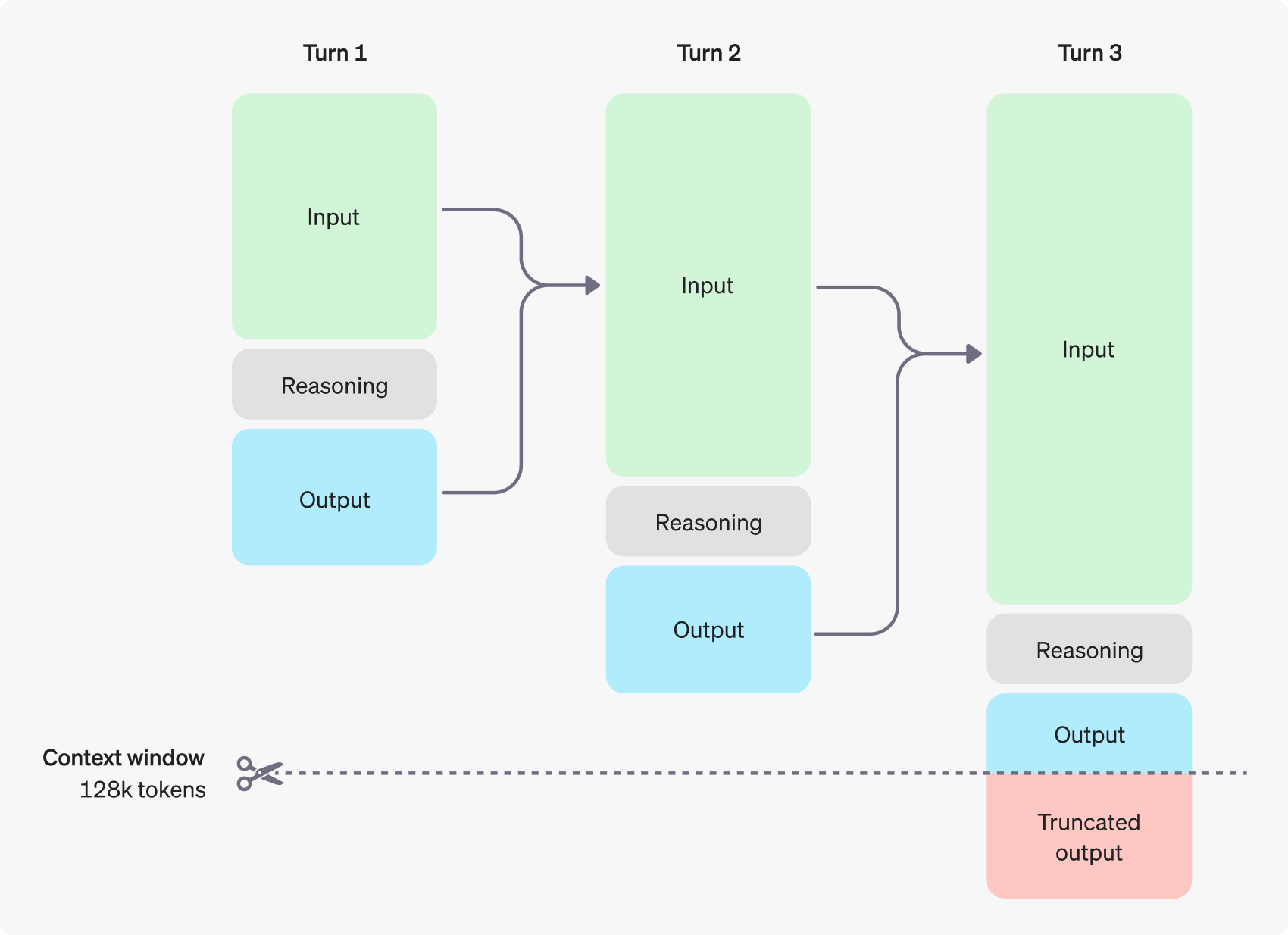 (Diagram Source: OpenAI)
Important: Reasoning tokens can be hidden from the final response text and still be billable and occupy the model's context window during generation. Across providers and models, they are billed at the selected model's output-token rate. When output_tokens already includes them, output_tokens_details.reasoning_tokens is a breakdown, so adding reasoning_tokens to output_tokens would double-count them. If a route reports visible output and reasoning separately, apply the same output-token rate to both counts.
Provider-Specific Reasoning Settings
Different model providers implement reasoning capabilities in their own ways. Here's how to use reasoning features with each provider through AvalAI:
Gemini Models Reasoning Settings
Google's current Gemini 3.8, 3.6, 3.5, and 3.1 reasoning-capable models support configurable thinking through Gemini generationConfig.thinkingConfig. For gemini-3.8-flash, gemini-flash-latest, gemini-3.6-flash, gemini-3.5-flash-lite, gemini-3.5-flash, gemini-3.1-pro-preview, gemini-3.1-flash-lite, and gemini-3.1-flash-lite-preview, use thinkingLevel to balance quality, latency, and cost. Higher effort on Gemini 3.8 Flash can spend more tokens on reasoning and iterative tool calls, so evaluate quality, latency, and token use together.
When using OpenAI client libraries with AvalAI, pass Gemini-specific settings through the extra_body parameter:
# Python example - Gemini thinking levels
response = client.chat.completions.create(
    model="gemini-3.8-flash",
    messages=[
        {
            "role": "user",
            "content": "Solve this complex math problem. Return the final answer, key assumptions, and a concise verification checklist: ...",
        }
    ],
    extra_body={"generationConfig": {"thinkingConfig": {"thinkingLevel": "high"}}},
)// JavaScript example - Gemini thinking levels
const response = await client.chat.completions.create({
model: "gemini-3.8-flash",
messages: [
{
role: "user",
content: "Solve this complex math problem. Return the final answer, key assumptions, and a concise verification checklist: ...",
},
],
// @ts-expect-error extra_body is supported by AvalAI for Gemini-specific options
extra_body: {
generationConfig: {
thinkingConfig: { thinkingLevel: "high" },
},
},
});Responses API version
Gemini 3.6 Flash and Gemini 3.5 Flash-Lite have partial /v1/responses support. Use this version when the parameters and tools required by your workflow are supported; messages moves to input, and the final text is read from response.output_text.
import os
from openai import OpenAI

client = OpenAI(
    api_key=os.environ["AVALAI_API_KEY"],
    base_url="https://api.avalai.ir/v1",
)

response = client.responses.create(
    model="gemini-3.6-flash",
    instructions="You are a helpful assistant.",
    input="Solve this complex math problem. Return the final answer, key assumptions, and a concise verification checklist: ...",
)

print(response.output_text)import OpenAI from "openai";
const client = new OpenAI({
apiKey: process.env.AVALAI_API_KEY,
baseURL: "https://api.avalai.ir/v1",
});
const response = await client.responses.create({
model: "gemini-3.6-flash",
instructions: "You are a helpful assistant.",
input: "Solve this complex math problem. Return the final answer, key assumptions, and a concise verification checklist: ...",
});
console.log(response.output_text);curl https://api.avalai.ir/v1/responses \
-H "Content-Type: application/json" \
-H "Authorization: Bearer $AVALAI_API_KEY" \
-d '
{
"model": "gemini-3.6-flash",
"input": "Solve this complex math problem. Return the final answer, key assumptions, and a concise verification checklist: ...",
"instructions": "You are a helpful assistant."
}'messages→input- system message →
instructionsor adeveloperitem choices[0].message.content→response.output_text- for tools and multimodal output, inspect
response.outputby itemtype.
The Gemini 3.6/3.5/3.1 thinking settings include:
thinkingLevel: Controls reasoning depth. Supported levels depend on the selected model and current route.- Higher thinking levels generally improve multi-step reasoning and tool-use quality, but can increase latency and token usage.
- Use a mid-range supported level for balanced production defaults and a higher supported level for complex coding, agentic, or analytical tasks.
For the native Gemini v1beta endpoint, pass the same configuration directly in the request body:
curl https://api.avalai.ir/v1beta/models/gemini-3.6-flash:generateContent \
  -H "Content-Type: application/json" \
  -H "Authorization: Bearer $AVALAI_API_KEY" \
  -d '{
    "contents": [{"role": "user", "parts": [{"text": "Plan a resilient migration from a monolith to microservices."}]}],
    "generationConfig": {
      "thinkingConfig": {"thinkingLevel": "high"}
    }
}'Legacy note
thinking_budget is specific to Gemini 2.5 Flash. For the most current information, reference the official Google AI documentation.
Gemini 2.5 Flash uses budget-based thinking controls:
# Python example - Gemini 2.5 Flash thinking budget
response = client.chat.completions.create(
    model="gemini-2.5-flash",
    messages=[
        {
            "role": "user",
            "content": "Solve this complex math problem. Return the final answer, key assumptions, and a concise verification checklist: ...",
        }
    ],
    extra_body={"thinking": {"type": "enabled", "budget_tokens": 2000}},
)// JavaScript example - Gemini 2.5 Flash thinking budget
const responseAlt = await client.chat.completions.create({
model: "gemini-2.5-flash",
messages: [{ role: "user", content: "Solve this complex math problem. Return the final answer, key assumptions, and a concise verification checklist: ..." }],
// @ts-expect-error thinking is an undocumented provider-specific parameter
thinking: { type: "enabled", budget_tokens: 2000 },
});Responses API version This version uses `gpt-5.5` because `gemini-2.5-flash` may not be enabled for `/v1/responses` in the current AvalAI model data.
Use this version when the selected model supports /v1/responses. messages moves to input, and the final text is read from response.output_text.
import os
from openai import OpenAI

client = OpenAI(
    api_key=os.environ["AVALAI_API_KEY"],
    base_url="https://api.avalai.ir/v1",
)

response = client.responses.create(
    model="gpt-5.6-sol",
    input=[
        {
            "role": "user",
            "content": [
                {
                    "type": "input_text",
                    "text": "Solve this complex math problem. Return the final answer, key assumptions, and a concise verification checklist: ...",
                },
                {"type": "input_file", "file_id": "file_abc123"},
            ],
        }
    ],
)

print(response.output_text)import OpenAI from "openai";
const client = new OpenAI({
apiKey: process.env.AVALAI_API_KEY,
baseURL: "https://api.avalai.ir/v1",
});
const response = await client.responses.create({
model: "gpt-5.6-sol",
input: [
{
role: "user",
content: [
{ type: "input_text", text: "Solve this complex math problem. Return the final answer, key assumptions, and a concise verification checklist: ..." },
{ type: "input_file", file_id: "file_abc123" },
],
},
],
});
console.log(response.output_text);curl https://api.avalai.ir/v1/responses \
-H "Content-Type: application/json" \
-H "Authorization: Bearer $AVALAI_API_KEY" \
-d '
{
"model": "gpt-5.6-sol",
"input": [
{
"role": "user",
"content": [
{
"type": "input_text",
"text": "Solve this complex math problem. Return the final answer, key assumptions, and a concise verification checklist: ..."
},
{
"type": "input_file",
"file_id": "file_abc123"
}
]
}
]
}'messages→input- system message →
instructionsor adeveloperitem choices[0].message.content→response.output_text- for tools and multimodal output, inspect
response.outputby itemtype.
By setting appropriate thinking levels or budgets, you can control both the depth of reasoning and the cost of your API calls.
Anthropic Models Reasoning Settings
Anthropic's Claude models (specifically claude-haiku-5-5, claude-sonnet-5-5, claude-opus-5-5, claude-fable-5-1, claude-opus-5, claude-sonnet-5, claude-opus-4-8, claude-opus-4-7, claude-sonnet-4-6, claude-haiku-4-5) support configurable reasoning through provider-specific thinking settings. See the Haiku 5.5 guidance for its effort control and pricing threshold, and the Sonnet 5.5 guidance for its migration requirements. For Claude Opus 5.5, Claude Fable 5.1, and Claude Opus 5, use thinking: {"type": "adaptive"} together with output_config.effort; do not send a fixed extended-thinking budget. Claude Opus 5.5 and Claude Fable 5.1 keep thinking enabled. Opus 5.5 defaults to medium; see its dedicated guidance for forced-tool and conversation-history constraints. Increase effort only when evaluations show a material improvement in task success.
response = client.chat.completions.create(
    model="claude-fable-5-1",
    messages=[
        {
            "role": "user",
            "content": "Analyze this migration design, identify failure modes, and verify the rollback plan.",
        }
    ],
    extra_body={
        "thinking": {"type": "adaptive"},
        "output_config": {"effort": "high"},
    },
)Responses API version Claude Fable 5.1 has partial `/v1/responses` support; verify required fields and tools before production use.
Use this version when the selected model supports /v1/responses. messages moves to input, and the final text is read from response.output_text.
import os
from openai import OpenAI

client = OpenAI(
    api_key=os.environ["AVALAI_API_KEY"],
    base_url="https://api.avalai.ir/v1",
)

response = client.responses.create(
    model="gpt-5.6-sol",
    instructions="You are a helpful assistant.",
    input="Analyze this migration design, identify failure modes, and verify the rollback plan.",
)

print(response.output_text)messages→input- system message →
instructionsor adeveloperitem choices[0].message.content→response.output_text- for tools and multimodal output, inspect
response.outputby itemtype.
Anthropic effort controls are provider-specific; do not copy Gemini thinking parameters or OpenAI reasoning.effort fields without checking the selected route. Request concise rationales or verification evidence rather than hidden chain-of-thought.
OpenAI Models Reasoning Settings
OpenAI's latest reasoning-capable models (gpt-5.5, gpt-5.4-pro, gpt-5.4, gpt-5.4-mini, gpt-5.4-nano, gpt-5.3-codex, gpt-5-pro, o4-mini, o3, and o3-mini) have built-in reasoning capabilities that are automatically engaged when needed. For these models, you may see reasoning tokens included in your usage statistics, but the reasoning process is more integrated into the model's operation.
For more advanced control, some endpoints may support parameters like reasoning.effort to guide the amount of internal reasoning:
response = client.chat.completions.create(
    model="gpt-5.6-sol",
    messages=[
        {
            "role": "user",
            "content": "Design an algorithm to solve this optimization problem: ...",
        }
    ],
    extra_body={"reasoning": {"effort": "high"}},  # Request more thorough reasoning
)Responses API version
Use this version when the selected model supports /v1/responses. messages moves to input, and the final text is read from response.output_text.
import os
from openai import OpenAI

client = OpenAI(
    api_key=os.environ["AVALAI_API_KEY"],
    base_url="https://api.avalai.ir/v1",
)

response = client.responses.create(
    model="gpt-5.6-sol",
    instructions="You are a helpful assistant.",
    input="Design an algorithm to solve this optimization problem: ...",
)

print(response.output_text)messages→input- system message →
instructionsor adeveloperitem choices[0].message.content→response.output_text- for tools and multimodal output, inspect
response.outputby itemtype.
DeepSeek Models Reasoning Settings
For new integrations, use deepseek-v4.1-flash and the quick start above; existing deepseek-flash requests can keep their ID. Both now use DeepSeek-V4.1-Flash-1017, without client-side code or pricing changes. The base upgrade does not establish a new effort enum or update the historical settings below. AvalAI retains deepseek-reasoner and deepseek-chat under its August 14 compatibility policy, rather than applying the upstream July 24 retirement. The separate V4-Pro notice specified routing to V4.1 Flash at V4.1 Flash rates from September 14, 2026 at 04:00 UTC; do not treat it as part of this two-ID base upgrade.
Historical V4 settings: The settings and examples below document the earlier V4-Flash-0731 and pre-cutover V4-Pro behavior, not a recommendation to adopt Pro or a supported effort enum for V4.1 Flash. Supported thinking routes can return provider-specific reasoning_content alongside the final answer; preserve the fields required by your tool workflow.
Key Features:
reasoning_content: Contains the provider-exposed reasoning trace used for tool-call continuity and observabilitycontent: Contains the final answer- Reasoning trace: Use the provider-exposed trace for debugging, tool-call continuity, and observability
- Tool Call Integration: Thinking mode works with function calling
- Thinking Mode Toggle: Use
extra_body={"thinking": {"type": "enabled"}}or{"type": "disabled"}where the selected V4 route exposes the toggle - Reasoning Effort: DeepSeek-V4-Flash-0731 supports
reasoning_effort: "low","high", or"max"; verify V4-Pro values separately before sharing configuration across the family - Context Window: V4 flagships default to a 1M-token context window
Historical example (thinking mode, V4-Pro before the cutover):
response = client.chat.completions.create(
    model="deepseek-v4-pro",
    messages=[
        {
            "role": "user",
            "content": "9.11 and 9.8, which is greater?",
        }
    ],
    reasoning_effort="high",
    extra_body={"thinking": {"type": "enabled"}},
)

# Access the reasoning process
reasoning = response.choices[0].message.reasoning_content
# Access the final answer
answer = response.choices[0].message.contentResponses API version This version uses `gpt-5.5` because `deepseek-v4-pro` may not be enabled for `/v1/responses` in the current AvalAI model data.
Use this version when the selected model supports /v1/responses. messages moves to input, and the final text is read from response.output_text.
import os
from openai import OpenAI

client = OpenAI(
    api_key=os.environ["AVALAI_API_KEY"],
    base_url="https://api.avalai.ir/v1",
)

response = client.responses.create(
    model="gpt-5.6-sol",
    instructions="You are a helpful assistant.",
    input="9.11 and 9.8, which is greater?",
)

print(response.output_text)messages→input- system message →
instructionsor adeveloperitem choices[0].message.content→response.output_text- for tools and multimodal output, inspect
response.outputby itemtype.
Historical V4-Flash example:
response = client.chat.completions.create(
    model="deepseek-v4-flash",
    messages=[
        {
            "role": "user",
            "content": "Summarize the trade-offs between thinking and non-thinking modes.",
        }
    ],
    extra_body={"thinking": {"type": "enabled"}},
)Responses API version This version uses `gpt-5.5` because `deepseek-v4-flash` may not be enabled for `/v1/responses` in the current AvalAI model data.
Use this version when the selected model supports /v1/responses. messages moves to input, and the final text is read from response.output_text.
import os
from openai import OpenAI

client = OpenAI(
    api_key=os.environ["AVALAI_API_KEY"],
    base_url="https://api.avalai.ir/v1",
)

response = client.responses.create(
    model="gpt-5.6-sol",
    instructions="You are a helpful assistant.",
    input="Summarize the trade-offs between thinking and non-thinking modes.",
)

print(response.output_text)messages→input- system message →
instructionsor adeveloperitem choices[0].message.content→response.output_text- for tools and multimodal output, inspect
response.outputby itemtype.
⚠️ Critical: Tool Calls with Thinking Mode
When using tool calls with DeepSeek V4 models in thinking mode (including deepseek-v4-pro, deepseek-v4-flash with thinking enabled, or the legacy deepseek-reasoner alias), you must pass the reasoning_content back to the API in subsequent requests within the same turn. Failure to do so will result in an error:
Missing reasoning_content field in the assistant messageCorrect Tool Call Implementation:
# When the model returns tool_calls, include reasoning_content in the assistant message
assistant_message = {
    "role": "assistant",
    "content": message.content or "",
    "tool_calls": [...],
    "reasoning_content": message.reasoning_content,  # CRITICAL: Must include this
}
messages.append(assistant_message)Multi-turn Conversation Rules:
- Within a single turn (while processing tool calls): Always include
reasoning_content - Between turns (new user message): Only pass
content, notreasoning_content
For complete documentation with examples in multiple languages, see the DeepSeek Models Documentation.
Official Reference: DeepSeek Thinking Mode - Tool Calls
Direct HTTP Requests
When making direct HTTP requests or using curl, you can include these parameters directly in the request body:
curl https://api.avalai.ir/v1/chat/completions \
  -H "Authorization: Bearer $AVALAI_API_KEY" \
  -H "Content-Type: application/json" \
  -d '{
"model": "gemini-3.1-flash-lite-preview",
"messages": [{"role": "user", "content": "Solve this complex math problem. Return the final answer, key assumptions, and a concise verification checklist: ..."}],
"thinking": {"type": "enabled", "budget_tokens": 2000}
}'Responses API version This version uses `gpt-5.5` because `gemini-3.1-flash-lite-preview` may not be enabled for `/v1/responses` in the current AvalAI model data.
Use this version when the selected model supports /v1/responses. messages moves to input, and the final text is read from response.output_text.
curl https://api.avalai.ir/v1/responses \
  -H "Content-Type: application/json" \
  -H "Authorization: Bearer $AVALAI_API_KEY" \
  -d '
  {
    "model": "gpt-5.6-sol",
    "input": "Solve this complex math problem. Return the final answer, key assumptions, and a concise verification checklist: ...",
    "instructions": "You are a helpful assistant."
}'messages→input- system message →
instructionsor adeveloperitem choices[0].message.content→response.output_text- for tools and multimodal output, inspect
response.outputby itemtype.
By adjusting these parameters, you can balance reasoning depth against cost and speed for your specific use case across different model providers.
Managing the Context Window
Ensure sufficient space remains in the context window for both the expected output and the internal reasoning tokens. Complex problems might require thousands or even tens of thousands of reasoning tokens.
You can often find the breakdown of token usage (including reasoning tokens, if exposed by the API) in the usage object of the API response. For OpenAI Responses, output_tokens is the generated-output total including reasoning tokens; the nested reasoning_tokens value is not an additional amount to add.
Example OpenAI Responses usage object:
{
  "usage": {
    "input_tokens": 75,
    "input_tokens_details": {
      "cached_tokens": 0
    },
    "output_tokens": 1186,
    "output_tokens_details": {
      "reasoning_tokens": 1024
    },
    "total_tokens": 1261
  }
}Check the AvalAI Models documentation for context window lengths for specific models.
Use usage telemetry as a tuning loop:
- Log
model,reasoning.effort,max_output_tokens, latency, status, and token usage for each eval case. - Watch for high
reasoning_tokenswith low answer-quality gains; lower effort or simplify the prompt when this happens. - Watch for
status: "incomplete"or missing visible output; increasemax_output_tokens, split the task, or reduce retrieved context. - Keep separate baselines for Chat Completions and Responses, because Responses can preserve reasoning items across tool calls while Chat Completions remains stateless.
Controlling Costs
To manage costs:
- Be mindful of the
reasoning.effort(or equivalent) parameter if available. Higher effort usually means more tokens. - Use the
max_tokens(or equivalent parameter likemax_output_tokens) in your API request to limit the total number of tokens generated (reasoning + output).
Allocating Space for Reasoning
max_output_tokens (Responses), max_completion_tokens (Chat Completions), and legacy max_tokens are shared generation budgets on reasoning-capable models: hidden reasoning tokens and visible answer tokens can both consume them. They do not reserve a separate allowance for the final answer.
If reasoning consumes the entire limit, the response can contain a reasoning item but no text. This is a token-budget exhaustion case, not necessarily a content-filter or model-availability problem. Typical evidence includes:
- Responses:
status: "incomplete"andincomplete_details.reason: "max_output_tokens". - Usage:
output_tokens_details.reasoning_tokensis close to the totaloutput_tokens, while visible text is empty or missing. - Chat Completions:
finish_reason: "length", possibly before useful visible content is produced.
To recover, increase the applicable output limit within the model's supported maximum, lower reasoning.effort to low or none when the model supports it, simplify or split the task, and leave measured headroom for the final answer. Do not size the limit only from the desired visible answer length. Record usage by model and prompt class because reasoning demand varies between requests, even for the same model.
Handling Incomplete Responses (Example)
Your code should check for indicators that generation was stopped due to token limits.
import json

# ... (client setup and initial request as before) ...

try:
    response = client.chat.completions.create(
        model="gpt-5.6-sol",
        messages=[{"role": "user", "content": prompt}],
        max_tokens=300,  # Limit total generated tokens (reasoning + output)
        # Add reasoning parameters if applicable
    )

    finish_reason = response.choices[0].finish_reason
    output_text = response.choices[0].message.content

    if finish_reason == "length":  # Standard finish reason for max_tokens
        print("Ran out of tokens (max_tokens reached).")
        if output_text:
            print("Partial output:", output_text)
        else:
            # This implies the limit was hit during internal reasoning
            print("Ran out of tokens during reasoning phase.")
    elif finish_reason == "stop":
        print("Completed successfully:")
        print(output_text)
    else:
        print(f"Finished with reason: {finish_reason}")
    if output_text:
        print("Output:", output_text)

except Exception as e:
print(f"An API error occurred: {e}")// ... (client setup and initial request as before) ...
async function runReasoningWithLimit() {
try {
const response = await client.chat.completions.create({
model: "gpt-5.6-sol",
messages: [{ role: "user", content: prompt }],
max_tokens: 300, // Limit total generated tokens
// Add reasoning parameters if applicable
});
const finish_reason = response.choices[0].finish_reason;
const output_text = response.choices[0].message.content;
if (finish_reason === "length") {
// Standard finish reason for max_tokens
console.log("Ran out of tokens (max_tokens reached).");
if (output_text) {
console.log("Partial output:", output_text);
} else {
console.log("Ran out of tokens during reasoning phase.");
}
} else if (finish_reason === "stop") {
console.log("Completed successfully:");
console.log(output_text);
} else {
console.log(`Finished with reason: ${finish_reason}`);
if (output_text) {
console.log("Output:", output_text);
}
}
} catch (error) {
console.error("An API error occurred:", error);
}
}
runReasoningWithLimit();package main
import (
"context"
"fmt"
"os"
openai "github.com/openai/openai-go"
)
func main() {
// ... (client setup as before) ...
prompt := "..." // Your prompt here
maxTokens := 300 // Define max_tokens
resp, err := client.CreateChatCompletion(
context.Background(),
openai.ChatCompletionRequest{
model: "gpt-5.6-luna",
Messages: []openai.ChatCompletionMessage{
{Role: openai.ChatMessageRoleUser, Content: prompt},
},
MaxTokens: maxTokens, // Limit total generated tokens
// Add reasoning parameters if applicable
},
)
if err != nil {
fmt.Printf("ChatCompletion error: %v\n", err)
return
}
finishReason := resp.Choices[0].FinishReason
outputText := resp.Choices[0].Message.Content
if finishReason == openai.FinishReasonLength { // Check for length finish reason
fmt.Println("Ran out of tokens (max_tokens reached).")
if outputText != "" {
fmt.Println("Partial output:", outputText)
} else {
fmt.Println("Ran out of tokens during reasoning phase.")
}
} else if finishReason == openai.FinishReasonStop {
fmt.Println("Completed successfully:")
fmt.Println(outputText)
} else {
fmt.Printf("Finished with reason: %s\n", finishReason)
if outputText != "" {
fmt.Println("Output:", outputText)
}
}
}<?php
require 'vendor/autoload.php';
// ... (client setup as before) ...
$prompt = "..."; // Your prompt here
$maxTokens = 300; // Define max_tokens
try {
$response = $client->chat()->create([
'model' => 'gpt-5.6-luna',
'messages' => [
['role' => 'user', 'content' => $prompt],
],
'max_tokens' => $maxTokens, // Limit total generated tokens
// Add reasoning parameters if applicable
]);
$finishReason = $response->choices[0]->finishReason;
// Ensure content exists before accessing
$outputText = $response->choices[0]->message->content ?? null;
if ($finishReason === 'length') { // Check for length finish reason
echo "Ran out of tokens (max_tokens reached).\n";
if ($outputText) {
echo "Partial output: " . $outputText . "\n";
} else {
echo "Ran out of tokens during reasoning phase.\n";
}
} elseif ($finishReason === 'stop') {
echo "Completed successfully:\n";
echo $outputText . "\n";
} else {
echo "Finished with reason: " . $finishReason . "\n";
if ($outputText) {
echo "Output: " . $outputText . "\n";
}
}
} catch (Exception $e) {
echo "An API error occurred: " . $e->getMessage() . "\n";
}
?>Responses API version
Use this version when the selected model supports /v1/responses. Chat Completions reports token exhaustion with finish_reason: "length"; Responses reports it with status: "incomplete" and incomplete_details.reason: "max_output_tokens".
import os
from openai import OpenAI

client = OpenAI(
    api_key=os.environ["AVALAI_API_KEY"],
    base_url="https://api.avalai.ir/v1",
)

prompt = """
Write a bash script that takes a matrix represented as a string with
format '[1,2],[3,4],[5,6]' and prints the transpose in the same format.
"""

response = client.responses.create(
    model="gpt-5.6-sol",
    reasoning={"effort": "medium"},
    input=[{"role": "user", "content": prompt}],
    max_output_tokens=300,
)

if (
    response.status == "incomplete"
    and response.incomplete_details.reason == "max_output_tokens"
):
    print("Ran out of tokens.")
    if response.output_text:
        print("Partial output:", response.output_text)
    else:
        print("Ran out of tokens during reasoning.")
else:
print(response.output_text)import OpenAI from "openai";
const client = new OpenAI({
apiKey: process.env.AVALAI_API_KEY,
baseURL: "https://api.avalai.ir/v1",
});
const prompt = `
Write a bash script that takes a matrix represented as a string with
format '[1,2],[3,4],[5,6]' and prints the transpose in the same format.
`;
const response = await client.responses.create({
model: "gpt-5.6-sol",
reasoning: { effort: "medium" },
input: [{ role: "user", content: prompt }],
max_output_tokens: 300,
});
if (
response.status === "incomplete" &&
response.incomplete_details?.reason === "max_output_tokens"
) {
console.log("Ran out of tokens.");
if (response.output_text) {
console.log("Partial output:", response.output_text);
} else {
console.log("Ran out of tokens during reasoning.");
}
} else {
console.log(response.output_text);
}PROMPT='Write a bash script that takes a matrix represented as a string with format "[1,2],[3,4],[5,6]" and prints the transpose in the same format.'
jq -n --arg prompt "$PROMPT" '{
model: "gpt-5.6-sol",
reasoning: {effort: "medium"},
input: [{role: "user", content: $prompt}],
max_output_tokens: 300
}' | curl https://api.avalai.ir/v1/responses \
-H "Content-Type: application/json" \
-H "Authorization: Bearer $AVALAI_API_KEY" \
-d @- | jq '{
status,
incomplete_reason: .incomplete_details.reason,
output_text
}'messages→input- system message →
instructionsor adeveloperitem max_tokens→max_output_tokenschoices[0].finish_reason == "length"→status == "incomplete"withincomplete_details.reasonchoices[0].message.content→response.output_text- for tools and multimodal output, inspect
response.outputby itemtype.
Advice on Prompting
Prompting reasoning models can differ slightly from prompting standard GPT models.
- Reasoning Models: Often perform well with higher-level goals and fewer prescribed intermediate steps. Think of them as senior collaborators you can trust to figure out the details.
- GPT Models: Often benefit from very precise instructions and clear definitions of the desired output format. Think of them as junior collaborators needing explicit guidance.
Experiment with providing the overall objective and letting the reasoning model determine the best path, versus providing detailed steps.
Prompt Examples
(Note: The following examples use reasoning-capable models such as gpt-5.5, deepseek-v4.1-flash, qwen3.7-max, and glm-5.3. GLM-5.3 requires thinking.type: "enabled" and accepts low, high, or max reasoning effort; these effort values are not a DeepSeek V4.1 Flash contract. Adjust parameters/endpoints as needed based on AvalAI's specific implementation.)
1. Coding (Refactoring)
Task: Refactor a React component to change text color based on data.
// --- Calling Code (Node.js) ---
import OpenAI from "openai";
import * as dotenv from "dotenv";
dotenv.config();

const client = new OpenAI({
  apiKey: process.env.AVALAI_API_KEY,
  baseURL: "https://api.avalai.ir/v1",
});

// Note the change here: Use indentation for the inner code example
// instead of triple backticks within the prompt string.
const prompt = `

Instructions:- Given the React component below, change it so that nonfiction books have red text.
- Return only the refactored React component code in your reply.
- Do not include explanations or markdown code blocks.
- Use four spaces for indentation.
- Keep lines under 80 columns.

Original Code:

    const books = [
     { title: 'Dune', category: 'fiction', id: 1 },
     { title: 'Frankenstein', category: 'fiction', id: 2 },
     { title: 'Moneyball', category: 'nonfiction', id: 3 },
    ];

    export default function BookList() {
     const listItems = books.map(book =>
     <li>
     {book.title}
     </li>
     );

     return (
     <ul>{listItems}</ul>
     );
    }

`.trim();

async function refactorCode() {
  try {
    const response = await client.chat.completions.create({
      model: "gpt-5.6-sol", // Use a suitable reasoning model from AvalAI
      messages: [{ role: "user", content: prompt }],
      temperature: 0.1, // Lower temperature for more predictable code output
    });
    console.log(response.choices[0].message.content);
  } catch (error) {
    console.error("API Error:", error);
  }
}

refactorCode();# --- Calling Code (Python) ---
from openai import OpenAI
import os
client = OpenAI(
api_key=os.environ.get("AVALAI_API_KEY"),
base_url="https://api.avalai.ir/v1",
)
# Note the change here: Use indentation for the inner code example
# instead of triple backticks within the prompt string.
prompt = """
Instructions:- Given the React component below, change it so that nonfiction books have red text.
- Return only the refactored React component code in your reply.
- Do not include explanations or markdown code blocks.
- Use four spaces for indentation.
- Keep lines under 80 columns.
Original Code:
const books = [
{ title: 'Dune', category: 'fiction', id: 1 },
{ title: 'Frankenstein', category: 'fiction', id: 2 },
{ title: 'Moneyball', category: 'nonfiction', id: 3 },
];
export default function BookList() {
const listItems = books.map(book =>
<li>
{book.title}
</li>
);
return (
<ul>{listItems}</ul>
);
}
""".strip()
try:
response = client.chat.completions.create(
model="gpt-5.6-sol", # Use a suitable reasoning model from AvalAI
messages=[{"role": "user", "content": prompt}],
temperature=0.1, # Lower temperature for more predictable code output
)
print(response.choices[0].message.content)
except Exception as e:
print(f"API Error: {e}")# --- Calling Code (Bash/cURL) ---
# Note the change here: Use indentation for the inner code example
# instead of triple backticks within the prompt string.
PROMPT=$(
cat <<'EOF'
Instructions:- Given the React component below, change it so that nonfiction books have red text.
- Return only the refactored React component code in your reply.
- Do not include explanations or markdown code blocks.
- Use four spaces for indentation.
- Keep lines under 80 columns.
Original Code:
const books = [
{ title: 'Dune', category: 'fiction', id: 1 },
{ title: 'Frankenstein', category: 'fiction', id: 2 },
{ title: 'Moneyball', category: 'nonfiction', id: 3 },
];
export default function BookList() {
const listItems = books.map(book =>
<li>
{book.title}
</li>
);
return (
<ul>{listItems}</ul>
);
}
EOF
)
# Escape JSON special characters in the prompt
JSON_PROMPT=$(echo "$PROMPT" | jq -Rsa .)
curl https://api.avalai.ir/v1/chat/completions \
-H "Authorization: Bearer $AVALAI_API_KEY" \
-H "Content-Type: application/json" \
-d '{
"model": "gpt-5.6-sol",
"messages": [{"role": "user", "content": '"$JSON_PROMPT"'}],
"temperature": 0.1
}'// --- Calling Code (Go) ---
package main
import (
"context"
"fmt"
"os"
"strings"
openai "github.com/openai/openai-go"
)
func main() {
apiKey := os.Getenv("AVALAI_API_KEY")
baseURL := "https://api.avalai.ir/v1"
config := openai.DefaultConfig(apiKey)
config.BaseURL = baseURL
client := openai.NewClientWithConfig(config)
// Note the change here: Use indentation for the inner code example
// instead of triple backticks within the prompt string.
prompt := strings.TrimSpace(`
Instructions:- Given the React component below, change it so that nonfiction books have red text.
- Return only the refactored React component code in your reply.
- Do not include explanations or markdown code blocks.
- Use four spaces for indentation.
- Keep lines under 80 columns.
Original Code:
const books = [
{ title: 'Dune', category: 'fiction', id: 1 },
{ title: 'Frankenstein', category: 'fiction', id: 2 },
{ title: 'Moneyball', category: 'nonfiction', id: 3 },
];
export default function BookList() {
const listItems = books.map(book =>
<li>
{book.title}
</li>
);
return (
<ul>{listItems}</ul>
);
}
`)
temp := float32(0.1)
resp, err := client.CreateChatCompletion(
context.Background(),
openai.ChatCompletionRequest{
model: "gpt-5.6-luna", // Use a suitable reasoning model from AvalAI
Messages: []openai.ChatCompletionMessage{
{Role: openai.ChatMessageRoleUser, Content: prompt},
},
Temperature: &temp,
},
)
if err != nil {
fmt.Printf("API Error: %v\n", err)
return
}
fmt.Println(resp.Choices[0].Message.Content)
}// --- Calling Code (PHP) ---
<?php
require 'vendor/autoload.php';
use OpenAI\Client;
$apiKey = getenv('AVALAI_API_KEY');
$baseURL = 'https://api.avalai.ir/v1';
// Configure client (example)
$client = OpenAI::client($apiKey);
// Set base URL if needed via factory/config
// Note the change here: Use indentation for the inner code example
// instead of triple backticks within the prompt string.
$prompt = trim(<<<PROMPT
Instructions:- Given the React component below, change it so that nonfiction books have red text.
- Return only the refactored React component code in your reply.
- Do not include explanations or markdown code blocks.
- Use four spaces for indentation.
- Keep lines under 80 columns.
Original Code:
const books = [
{ title: 'Dune', category: 'fiction', id: 1 },
{ title: 'Frankenstein', category: 'fiction', id: 2 },
{ title: 'Moneyball', category: 'nonfiction', id: 3 },
];
export default function BookList() {
const listItems = books.map(book =>
<li>
{book.title}
</li>
);
return (
<ul>{listItems}</ul>
);
}
PROMPT);
try {
$response = $client->chat()->create([
'model' => 'gpt-5.6-luna', // Use a suitable reasoning model from AvalAI
'messages' => [
['role' => 'user', 'content' => $prompt],
],
'temperature' => 0.1,
]);
echo $response->choices[0]->message->content;
} catch (Exception $e) {
echo "API Error: " . $e->getMessage() . "\n";
}
?>Responses API version
Use this version when the selected model supports /v1/responses. It keeps the same refactoring task, moves the application rules into instructions, and uses a low reasoning effort because the edit is constrained and well specified.
import os
from openai import OpenAI

client = OpenAI(
    api_key=os.environ["AVALAI_API_KEY"],
    base_url="https://api.avalai.ir/v1",
)

prompt = """
Given the React component below, change it so that nonfiction books have red text.
Return only the refactored React component code in your reply.
Do not include explanations or markdown code blocks.
Use four spaces for indentation.
Keep lines under 80 columns.

Original Code:

    const books = [
     { title: 'Dune', category: 'fiction', id: 1 },
     { title: 'Frankenstein', category: 'fiction', id: 2 },
     { title: 'Moneyball', category: 'nonfiction', id: 3 },
    ];

    export default function BookList() {
     const listItems = books.map(book =>
     <li>
     {book.title}
     </li>
     );

     return (
     <ul>{listItems}</ul>
     );
    }
"""

response = client.responses.create(
    model="gpt-5.6-sol",
    reasoning={"effort": "low"},
    instructions=(
        "Formatting re-enabled\n"
        "You refactor code precisely. Return only the requested code."
    ),
    input=prompt,
)

print(response.output_text)import OpenAI from "openai";
const client = new OpenAI({
apiKey: process.env.AVALAI_API_KEY,
baseURL: "https://api.avalai.ir/v1",
});
const prompt = `
Given the React component below, change it so that nonfiction books have red text.
Return only the refactored React component code in your reply.
Do not include explanations or markdown code blocks.
Use four spaces for indentation.
Keep lines under 80 columns.
Original Code:
const books = [
{ title: 'Dune', category: 'fiction', id: 1 },
{ title: 'Frankenstein', category: 'fiction', id: 2 },
{ title: 'Moneyball', category: 'nonfiction', id: 3 },
];
export default function BookList() {
const listItems = books.map(book =>
<li>
{book.title}
</li>
);
return (
<ul>{listItems}</ul>
);
}
`;
const response = await client.responses.create({
model: "gpt-5.6-sol",
reasoning: { effort: "low" },
instructions:
"Formatting re-enabled\nYou refactor code precisely. Return only the requested code.",
input: prompt,
});
console.log(response.output_text);PROMPT=$(
cat <<'EOF'
Given the React component below, change it so that nonfiction books have red text.
Return only the refactored React component code in your reply.
Do not include explanations or markdown code blocks.
Use four spaces for indentation.
Keep lines under 80 columns.
Original Code:
const books = [
{ title: 'Dune', category: 'fiction', id: 1 },
{ title: 'Frankenstein', category: 'fiction', id: 2 },
{ title: 'Moneyball', category: 'nonfiction', id: 3 },
];
export default function BookList() {
const listItems = books.map(book =>
<li>
{book.title}
</li>
);
return (
<ul>{listItems}</ul>
);
}
EOF
)
jq -n --arg prompt "$PROMPT" '{
model: "gpt-5.6-sol",
reasoning: {effort: "low"},
instructions: "Formatting re-enabled\nYou refactor code precisely. Return only the requested code.",
input: $prompt
}' | curl https://api.avalai.ir/v1/responses \
-H "Content-Type: application/json" \
-H "Authorization: Bearer $AVALAI_API_KEY" \
-d @-messages→input- system message →
instructionsor adeveloperitem choices[0].message.content→response.output_text- for tools and multimodal output, inspect
response.outputby itemtype.
2. Coding (Planning)
Task: Plan and generate code for a simple Python Q&A application.
// --- Calling Code (Node.js) ---
import OpenAI from "openai";
import * as dotenv from "dotenv";
dotenv.config();

const client = new OpenAI({
  apiKey: process.env.AVALAI_API_KEY,
  baseURL: "https://api.avalai.ir/v1",
});

const prompt = `
I want to build a Python app that takes user questions and looks them up
in a simple key-value store (like a dictionary or JSON file) where they
are mapped to answers. If there is a close match (case-insensitive check),
it retrieves the matched answer. If there isn't, it asks the user to
provide an answer and stores the new question/answer pair.

1. Make a plan for the directory structure (e.g., main script, data file).
2. Return the full Python code for the main script.
3. Return an example JSON structure for the data file.
4. Only supply explanatory text at the very beginning and very end, not mixed within the code or file structure output.
`.trim();

async function planProject() {
  try {
    const response = await client.chat.completions.create({
      model: "deepseek-v4.1-flash", // Use the explicit V4.1 Flash model ID
      messages: [{ role: "user", content: prompt }],
    });
    console.log(response.choices[0].message.content);
  } catch (error) {
    console.error("API Error:", error);
  }
}

planProject();# --- Calling Code (Python) ---
from openai import OpenAI
import os
client = OpenAI(
api_key=os.environ.get("AVALAI_API_KEY"),
base_url="https://api.avalai.ir/v1",
)
prompt = """
I want to build a Python app that takes user questions and looks them up
in a simple key-value store (like a dictionary or JSON file) where they
are mapped to answers. If there is a close match (case-insensitive check),
it retrieves the matched answer. If there isn't, it asks the user to
provide an answer and stores the new question/answer pair.
1. Make a plan for the directory structure (e.g., main script, data file).
2. Return the full Python code for the main script.
3. Return an example JSON structure for the data file.
4. Only supply explanatory text at the very beginning and very end, not mixed within the code or file structure output.
""".strip()
try:
response = client.chat.completions.create(
model="deepseek-v4.1-flash", # Use the explicit V4.1 Flash model ID
messages=[{"role": "user", "content": prompt}],
)
print(response.choices[0].message.content)
except Exception as e:
print(f"API Error: {e}")# --- Calling Code (Bash/cURL) ---
PROMPT=$(
cat <<'EOF'
I want to build a Python app that takes user questions and looks them up
in a simple key-value store (like a dictionary or JSON file) where they
are mapped to answers. If there is a close match (case-insensitive check),
it retrieves the matched answer. If there isn't, it asks the user to
provide an answer and stores the new question/answer pair.
1. Make a plan for the directory structure (e.g., main script, data file).
2. Return the full Python code for the main script.
3. Return an example JSON structure for the data file.
4. Only supply explanatory text at the very beginning and very end, not mixed within the code or file structure output.
EOF
)
# Escape JSON special characters
JSON_PROMPT=$(echo "$PROMPT" | jq -Rsa .)
curl https://api.avalai.ir/v1/chat/completions \
-H "Authorization: Bearer $AVALAI_API_KEY" \
-H "Content-Type: application/json" \
-d '{
"model": "deepseek-v4.1-flash",
"messages": [{"role": "user", "content": '"$JSON_PROMPT"'}]
}'// --- Calling Code (Go) ---
package main
import (
"context"
"fmt"
"os"
"strings"
openai "github.com/openai/openai-go"
)
func main() {
apiKey := os.Getenv("AVALAI_API_KEY")
baseURL := "https://api.avalai.ir/v1"
config := openai.DefaultConfig(apiKey)
config.BaseURL = baseURL
client := openai.NewClientWithConfig(config)
prompt := strings.TrimSpace(`
I want to build a Python app that takes user questions and looks them up
in a simple key-value store (like a dictionary or JSON file) where they
are mapped to answers. If there is a close match (case-insensitive check),
it retrieves the matched answer. If there isn't, it asks the user to
provide an answer and stores the new question/answer pair.
1. Make a plan for the directory structure (e.g., main script, data file).
2. Return the full Python code for the main script.
3. Return an example JSON structure for the data file.
4. Only supply explanatory text at the very beginning and very end, not mixed within the code or file structure output.
`)
resp, err := client.CreateChatCompletion(
context.Background(),
openai.ChatCompletionRequest{
Model: "deepseek-v4.1-flash", // Use the explicit V4.1 Flash model ID
Messages: []openai.ChatCompletionMessage{
{Role: openai.ChatMessageRoleUser, Content: prompt},
},
},
)
if err != nil {
fmt.Printf("API Error: %v\n", err)
return
}
fmt.Println(resp.Choices[0].Message.Content)
}// --- Calling Code (PHP) ---
<?php
require 'vendor/autoload.php';
use OpenAI\Client;
$apiKey = getenv('AVALAI_API_KEY');
$baseURL = 'https://api.avalai.ir/v1';
// Configure client (example)
$client = OpenAI::client($apiKey);
// Set base URL if needed via factory/config
$prompt = trim(<<<PROMPT
I want to build a Python app that takes user questions and looks them up
in a simple key-value store (like a dictionary or JSON file) where they
are mapped to answers. If there is a close match (case-insensitive check),
it retrieves the matched answer. If there isn't, it asks the user to
provide an answer and stores the new question/answer pair.
1. Make a plan for the directory structure (e.g., main script, data file).
2. Return the full Python code for the main script.
3. Return an example JSON structure for the data file.
4. Only supply explanatory text at the very beginning and very end, not mixed within the code or file structure output.
PROMPT);
try {
$response = $client->chat()->create([
'model' => 'deepseek-v4.1-flash', // Use the explicit V4.1 Flash model ID
'messages' => [
['role' => 'user', 'content' => $prompt],
],
]);
echo $response->choices[0]->message->content;
} catch (Exception $e) {
echo "API Error: " . $e->getMessage() . "\n";
}
?>Alternative OpenAI Responses example
This example uses gpt-5.6-sol with its own reasoning controls for the same planning task. deepseek-v4.1-flash has partial Responses support; do not copy this model's effort settings or assume full built-in tool and stateful workflow parity. Check your exact workflow before switching endpoints.
import os
from openai import OpenAI

client = OpenAI(
    api_key=os.environ["AVALAI_API_KEY"],
    base_url="https://api.avalai.ir/v1",
)

prompt = """
I want to build a Python app that takes user questions and looks them up
in a simple key-value store (like a dictionary or JSON file) where they
are mapped to answers. If there is a close match (case-insensitive check),
it retrieves the matched answer. If there isn't, it asks the user to
provide an answer and stores the new question/answer pair.

1. Make a plan for the directory structure (e.g., main script, data file).
2. Return the full Python code for the main script.
3. Return an example JSON structure for the data file.
4. Only supply explanatory text at the very beginning and very end, not mixed within the code or file structure output.
"""

response = client.responses.create(
    model="gpt-5.6-sol",
    reasoning={"effort": "medium"},
    instructions=(
        "Formatting re-enabled\n"
        "You are a senior Python engineer. Follow the requested output contract exactly."
    ),
    input=prompt,
)

print(response.output_text)import OpenAI from "openai";
const client = new OpenAI({
apiKey: process.env.AVALAI_API_KEY,
baseURL: "https://api.avalai.ir/v1",
});
const prompt = `
I want to build a Python app that takes user questions and looks them up
in a simple key-value store (like a dictionary or JSON file) where they
are mapped to answers. If there is a close match (case-insensitive check),
it retrieves the matched answer. If there isn't, it asks the user to
provide an answer and stores the new question/answer pair.
1. Make a plan for the directory structure (e.g., main script, data file).
2. Return the full Python code for the main script.
3. Return an example JSON structure for the data file.
4. Only supply explanatory text at the very beginning and very end, not mixed within the code or file structure output.
`;
const response = await client.responses.create({
model: "gpt-5.6-sol",
reasoning: { effort: "medium" },
instructions:
"Formatting re-enabled\nYou are a senior Python engineer. Follow the requested output contract exactly.",
input: prompt,
});
console.log(response.output_text);PROMPT=$(
cat <<'EOF'
I want to build a Python app that takes user questions and looks them up
in a simple key-value store (like a dictionary or JSON file) where they
are mapped to answers. If there is a close match (case-insensitive check),
it retrieves the matched answer. If there isn't, it asks the user to
provide an answer and stores the new question/answer pair.
1. Make a plan for the directory structure (e.g., main script, data file).
2. Return the full Python code for the main script.
3. Return an example JSON structure for the data file.
4. Only supply explanatory text at the very beginning and very end, not mixed within the code or file structure output.
EOF
)
jq -n --arg prompt "$PROMPT" '{
model: "gpt-5.6-sol",
reasoning: {effort: "medium"},
instructions: "Formatting re-enabled\nYou are a senior Python engineer. Follow the requested output contract exactly.",
input: $prompt
}' | curl https://api.avalai.ir/v1/responses \
-H "Content-Type: application/json" \
-H "Authorization: Bearer $AVALAI_API_KEY" \
-d @-messages→input- system message →
instructionsor adeveloperitem choices[0].message.content→response.output_text- for tools and multimodal output, inspect
response.outputby itemtype.
3. STEM Research
Task: Ask for potential compounds for antibiotic research.
// --- Calling Code (Node.js) ---
import OpenAI from "openai";
import * as dotenv from "dotenv";
dotenv.config();

const client = new OpenAI({
  apiKey: process.env.AVALAI_API_KEY,
  baseURL: "https://api.avalai.ir/v1",
});

const prompt = `
What are three compounds or classes of compounds we should consider
investigating further to advance research into new antibiotics,
especially against resistant bacteria? Briefly explain why each
is promising.
`.trim();

async function researchQuery() {
  try {
    const response = await client.chat.completions.create({
      model: "gemini-3.1-pro-preview", // Use a suitable reasoning model from AvalAI
      messages: [{ role: "user", content: prompt }],
    });
    console.log(response.choices[0].message.content);
  } catch (error) {
    console.error("API Error:", error);
  }
}

researchQuery();# --- Calling Code (Python) ---
from openai import OpenAI
import os
client = OpenAI(
api_key=os.environ.get("AVALAI_API_KEY"),
base_url="https://api.avalai.ir/v1",
)
prompt = """
What are three compounds or classes of compounds we should consider
investigating further to advance research into new antibiotics,
especially against resistant bacteria? Briefly explain why each
is promising.
""".strip()
try:
response = client.chat.completions.create(
model="gemini-3.1-pro-preview", # Use a suitable reasoning model from AvalAI
messages=[{"role": "user", "content": prompt}],
)
print(response.choices[0].message.content)
except Exception as e:
print(f"API Error: {e}")# --- Calling Code (Bash/cURL) ---
PROMPT=$(
cat <<'EOF'
What are three compounds or classes of compounds we should consider
investigating further to advance research into new antibiotics,
especially against resistant bacteria? Briefly explain why each
is promising.
EOF
)
# Escape JSON special characters
JSON_PROMPT=$(echo "$PROMPT" | jq -Rsa .)
curl https://api.avalai.ir/v1/chat/completions \
-H "Authorization: Bearer $AVALAI_API_KEY" \
-H "Content-Type: application/json" \
-d '{
"model": "gemini-3.1-pro-preview",
"messages": [{"role": "user", "content": '"$JSON_PROMPT"'}]
}'// --- Calling Code (Go) ---
package main
import (
"context"
"fmt"
"os"
"strings"
openai "github.com/openai/openai-go"
)
func main() {
apiKey := os.Getenv("AVALAI_API_KEY")
baseURL := "https://api.avalai.ir/v1"
config := openai.DefaultConfig(apiKey)
config.BaseURL = baseURL
client := openai.NewClientWithConfig(config)
prompt := strings.TrimSpace(`
What are three compounds or classes of compounds we should consider
investigating further to advance research into new antibiotics,
especially against resistant bacteria? Briefly explain why each
is promising.
`)
resp, err := client.CreateChatCompletion(
context.Background(),
openai.ChatCompletionRequest{
Model: "gemini-3.1-pro-preview", // Use a suitable reasoning model from AvalAI
Messages: []openai.ChatCompletionMessage{
{Role: openai.ChatMessageRoleUser, Content: prompt},
},
},
)
if err != nil {
fmt.Printf("API Error: %v\n", err)
return
}
fmt.Println(resp.Choices[0].Message.Content)
}// --- Calling Code (PHP) ---
<?php
require 'vendor/autoload.php';
use OpenAI\Client;
$apiKey = getenv('AVALAI_API_KEY');
$baseURL = 'https://api.avalai.ir/v1';
// Configure client (example)
$client = OpenAI::client($apiKey);
// Set base URL if needed via factory/config
$prompt = trim(<<<PROMPT
What are three compounds or classes of compounds we should consider
investigating further to advance research into new antibiotics,
especially against resistant bacteria? Briefly explain why each
is promising.
PROMPT);
try {
$response = $client->chat()->create([
'model' => 'gemini-3.1-pro-preview', // Use a suitable reasoning model from AvalAI
'messages' => [
['role' => 'user', 'content' => $prompt],
],
]);
echo $response->choices[0]->message->content;
} catch (Exception $e) {
echo "API Error: " . $e->getMessage() . "\n";
}
?>Responses API version This version uses `gpt-5.5` because `gemini-3.1-pro-preview` may not be enabled for `/v1/responses` in the current AvalAI model data.
Use this version when the selected model supports /v1/responses. It keeps the same research-style prompt, but adds an explicit safety boundary so the answer stays high level and does not provide synthesis or wet-lab instructions.
import os
from openai import OpenAI

client = OpenAI(
    api_key=os.environ["AVALAI_API_KEY"],
    base_url="https://api.avalai.ir/v1",
)

prompt = """
What are three compounds or classes of compounds we should consider
investigating further to advance research into new antibiotics,
especially against resistant bacteria? Briefly explain why each is promising.
"""

response = client.responses.create(
    model="gpt-5.6-sol",
    reasoning={"effort": "high"},
    instructions=(
        "Formatting re-enabled\n"
        "Answer at a high scientific level. Do not include synthesis steps, "
        "dosages, protocols, or operational wet-lab instructions."
    ),
    input=prompt,
)

print(response.output_text)import OpenAI from "openai";
const client = new OpenAI({
apiKey: process.env.AVALAI_API_KEY,
baseURL: "https://api.avalai.ir/v1",
});
const prompt = `
What are three compounds or classes of compounds we should consider
investigating further to advance research into new antibiotics,
especially against resistant bacteria? Briefly explain why each is promising.
`;
const response = await client.responses.create({
model: "gpt-5.6-sol",
reasoning: { effort: "high" },
instructions:
"Formatting re-enabled\nAnswer at a high scientific level. Do not include synthesis steps, dosages, protocols, or operational wet-lab instructions.",
input: prompt,
});
console.log(response.output_text);PROMPT=$(
cat <<'EOF'
What are three compounds or classes of compounds we should consider
investigating further to advance research into new antibiotics,
especially against resistant bacteria? Briefly explain why each is promising.
EOF
)
jq -n --arg prompt "$PROMPT" '{
model: "gpt-5.6-sol",
reasoning: {effort: "high"},
instructions: "Formatting re-enabled\nAnswer at a high scientific level. Do not include synthesis steps, dosages, protocols, or operational wet-lab instructions.",
input: $prompt
}' | curl https://api.avalai.ir/v1/responses \
-H "Content-Type: application/json" \
-H "Authorization: Bearer $AVALAI_API_KEY" \
-d @-messages→input- system message →
instructionsor adeveloperitem choices[0].message.content→response.output_text- for tools and multimodal output, inspect
response.outputby itemtype.
Use Case Examples
Explore the AvalAI Cookbook (if available) or community resources for more examples of applying reasoning models to tasks like data validation, routine generation, and complex analysis.