
Account questions and troubleshooting
AvalAI Chat · Last updated 20 November 2026
Goal
Use the message on your screen to find the next step and get back into your account.
Before you start
Have the email address or phone number you registered with in mind. Keep a copy of the error message for support. Keep your sign-in code and password private.
Steps
- Read the message on your screen.
- Find the situation below that matches it.
- Try the corresponding action.
Common problems
The page asks for a valid email address or phone number
Enter your complete email address or recheck the digits of your phone number. If you pasted the text, remove any spaces at either end.
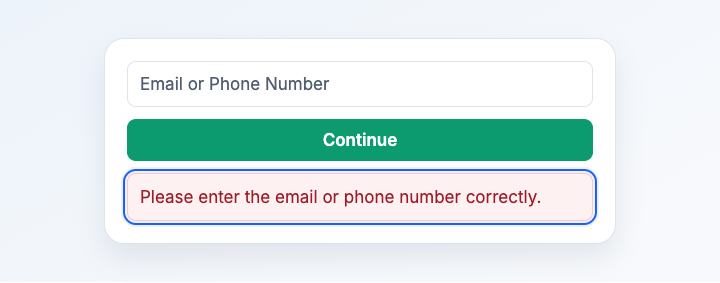
Illustration based on the development interface.
The code hasn’t arrived or doesn’t work
Check spam if you’re using email. For a phone code, check your recent messages and any other delivery method the screen names. When the resend option appears, request a new code if needed. If you have several codes, enter the latest one, including any zero at the beginning.
I forgot my password
Choose the one-time code option on the password screen or reset your password.
I can’t access my old phone number or email address
If another contact method is attached to the same account, sign in with it. If you’re still signed in on another device, check whether you can add another contact method. If you still need help, tell Support the error message and the step where you got stuck.
What you should see
After a successful sign-in, you’ll see Chat and your account menu. If the problem continues, you can tell Support exactly which step you reached.